21. Chapter Hygrothermograph DHT11
In this chapter, we will learn about a commonly used sensor called a Hygrothermograph DHT11.
21.1. Project Hygrothermograph
Hygrothermograph is an important tool in our lives to give us data on the temperature and humidity in our environment. In this project, we will use the RPi to read Temperature and Humidity data of the DHT11 Module.
21.1.1. Component List
|
Jumper Wires x4 |
DHT11 x1 |
Resistor 10kΩ x1 |


21.1.2. Component knowledge
The Temperature & Humidity Sensor DHT11 is a compound temperature & humidity sensor, and the output digital signal has been calibrated by its manufacturer.
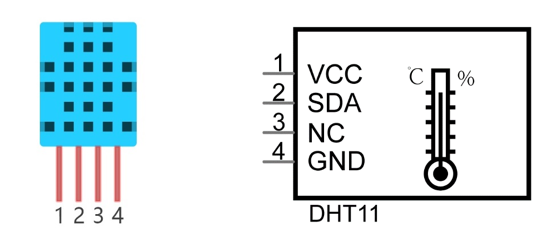
After being powered up, it will initialize in 1 second. Its operating voltage is within the range of 3.3V-5.5V.
The SDA pin is a data pin, which is used to communicate with other devices.
The NC pin (Not Connected Pin) are a type of pin found on various integrated circuit packages. Those pins have no functional purpose to the outside circuit (but may have an unknown functionality during manufacture and test). Those pins should not be connected to any of the circuit connections.
21.1.3. Circuit
Schematic diagram
|
Hardware connection. If you need any support,please feel free to contact us via:
|


Note
Youtube video: https://youtu.be/vTeuLWiXUTA
21.1.4. Code
The code is used to read the temperature and humidity data of DHT11, and display them.
21.1.4.1. Python Code DHT11
First, observe the project result, and then learn about the code in detail.
Hint
If you have any concerns, please contact us via: support@freenove.com
Use
cdcommand to enter folder of the ADC Device library.
$ cd ~/Freenove_Kit/Libs/Python-Libs/Freenove_DHT11
Execute command below to install the library.
$ sudo python setup.py
A successful installation, without error prompts, is shown below:

Next, we will execute the code for this project.
Use
cdcommand to enter 21.1.1_DHT11 directory of Python code.
$ cd ~/Freenove_Kit/Code/Python_GPIOZero_Code/21.1.1_DHT11
Use Python command to execute code
DHT11.py.
$ python DHT11.py
After the program is executed, the Terminal window will display the current total number of read times, the read state, as well as temperature and humidity values as is shown below:
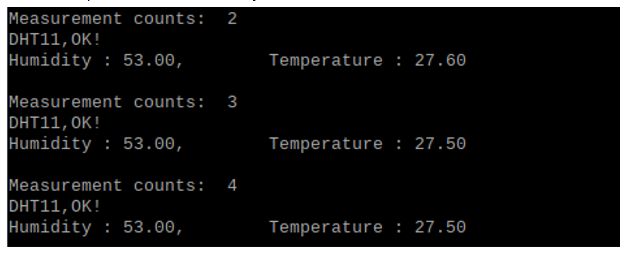
Since gpiozero does not support DHT11 sensors, RPi.GPIO is used here for control.
The following is the program code:
 1#!/usr/bin/env python3
 2#############################################################################
 3# Filename    : DHT11.py
 4# Description :	read the temperature and humidity data of DHT11
 5# Author      : freenove
 6# modification: 2024/07/29
 7########################################################################
 8import time
 9from Freenove_DHT import DHT
10
11DHTPin = 17     #define the pin of DHT11
12
13def loop():
14    dht = DHT(DHTPin)
15    time.sleep(1)
16    counts = 0     # Measurement counts
17    while(True):
18        counts += 1
19        print("Measurement counts: ", counts)
20        for i in range(0,15):
21            chk = dht.readDHT11()     #read DHT11 and get a return value. Then determine whether data read is normal according to the return value.
22            if (chk == 0):      #read DHT11 and get a return value. Then determine whether data read is normal according to the return value.
23                print("DHT11,OK!")
24                break
25            time.sleep(0.1)
26
27        print("Humidity : %.2f, \t Temperature : %.2f \n"%(dht.getHumidity(),dht.getTemperature()))
28        time.sleep(2)
29
30if __name__ == '__main__':
31    print ('Program is starting ... ')
32    try:
33        loop()
34    except KeyboardInterrupt:
35        pass
36        exit()
In this project code, we use a module “Freenove_DHT.py”, which provides the method of reading the DHT Sensor. It is located in the same directory with program files “DHT11.py”. By using this library, we can easily read the DHT Sensor. First, we create a DHT class object in the code.
1dht = DHT.DHT(DHTPin) #create a DHT class object
Then in the “while” loop, use chk = dht.readDHT11() to read the DHT11, and determine whether the data read is normal according to the return value “chk”. Then use variable sumCnt to record the number of times read.
 1while(True):
 2    counts += 1
 3    print("Measurement counts: ", counts)
 4    for i in range(0,15):
 5        chk = dht.readDHT11()     #read DHT11 and get a return value. Then determine whether data read is normal according to the return value.
 6        if (chk == 0):      #read DHT11 and get a return value. Then determine whether data read is normal according to the return value.
 7            print("DHT11,OK!")
 8            break
 9        time.sleep(0.1)
10
11    print("Humidity : %.2f, \t Temperature : %.2f \n"%(dht.getHumidity(),dht.getTemperature()))
12    time.sleep(2)
Finally display the results:
1print("Humidity : %.2f, \t Temperature : %.2f \n"%( dht.getHumidity(), dht.getTemperature()))
Module “Freenove_DHT.py” contains a DHT class. The class function of the def readDHT11 (pin) is used to read the DHT11 Sensor and store the temperature and humidity data read to member variables humidity and temperature.
- Freenove_DHT Module
This is a Python module for reading the temperature and humidity data of the DHT Sensor. Partial functions and variables are described as follows:
getHumidity(): store humidity data read from sensor
getTemperature(): store temperature data read from sensor
readDHT11(): read the temperature and humidity of sensor DHT11, and return values used to determine whether the data is normal.