18. Chapter LVGL Heartrate
In this chapter, we will learn how to create a heartrate monitor.
18.1. Project 18.1 LVGL Heartrate
In this project, we will learn how to obtain the raw data and heartrate data of the MAX30102 module and display them on the screen.
18.1.1. Component List
ESP32-S3 WROOM x1
|
USB cable x1
|
SDcard x1
|
|
Card reader x1 (random color) (Not a USB flash drive.)
|
2.8-inch screen
|
||
ESP32-S3 WROOM Shield x1 (Not a USB flash drive.)
|
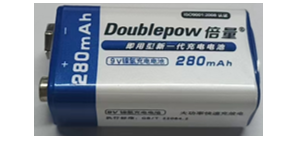
9V battery x1 (Not included in the kit, prepared by yourself)
|
||
9V battery cable x1
|
|||



18.1.2. Circuit
If you have not yet used the SD card, please refer to Chapter 4. Click here to navigate back to Chapter 4.
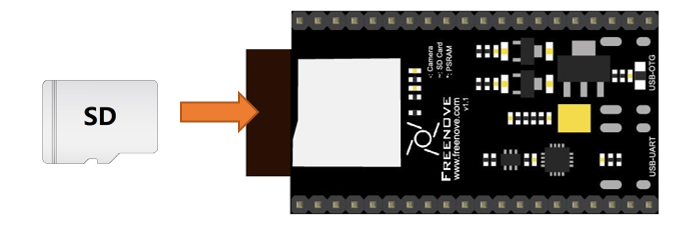
Before connecting the USB cable, insert the SD card into the SD card slot on the back of the ESP32-S3.
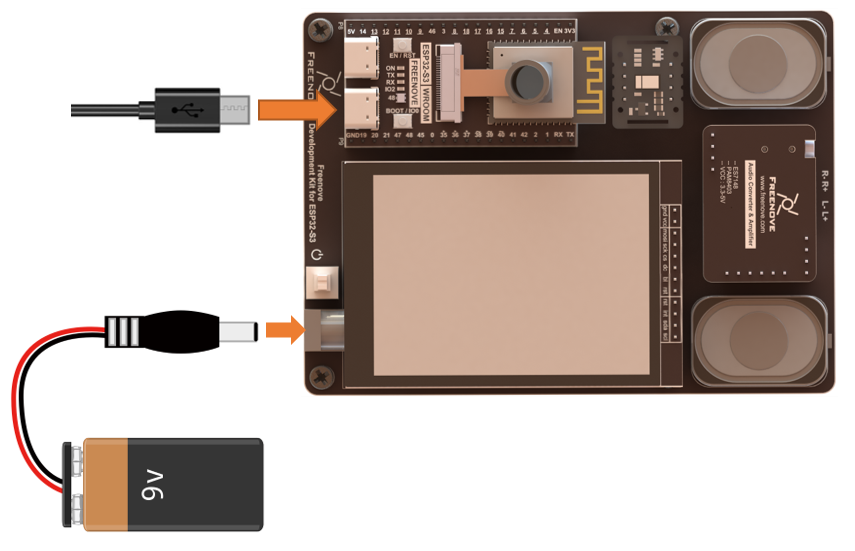
Connect Freenove ESP32-S3 to the computer using the USB cable.
18.1.3. Sketch
18.1.3.1. Sketch_18_LVGL_Heartrate
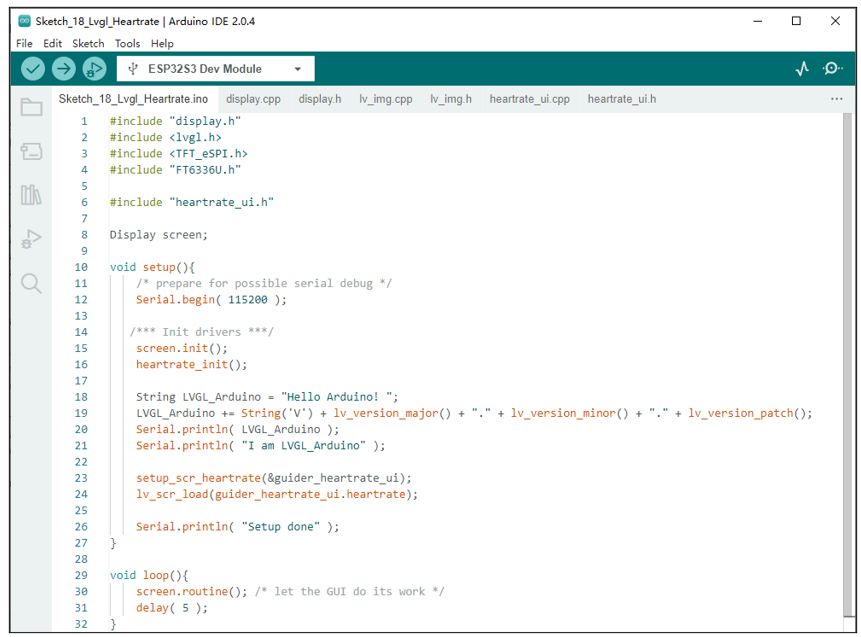
The following is the program code:
 1#include "display.h"
 2#include <lvgl.h>
 3#include <TFT_eSPI.h>
 4#include "FT6336U.h"
 5
 6#include "heartrate_ui.h"
 7
 8Display screen;
 9
10void setup(){
11    /* prepare for possible serial debug */
12    Serial.begin( 115200 );
13
14   /*** Init drivers ***/
15    screen.init();
16    heartrate_init();
17
18    String LVGL_Arduino = "Hello Arduino! ";
19    LVGL_Arduino += String('V') + lv_version_major() + "." + lv_version_minor() + "." + lv_version_patch();
20    Serial.println( LVGL_Arduino );
21    Serial.println( "I am LVGL_Arduino" );
22
23    setup_scr_heartrate(&guider_heartrate_ui);
24    lv_scr_load(guider_heartrate_ui.heartrate);
25
26    Serial.println( "Setup done" );
27}
28
29void loop(){
30    screen.routine(); /* let the GUI do its work */
31    delay( 5 );
32}
Configure the heart rate monitor interface and load this interface.
1setup_scr_heartrate(&guider_heartrate_ui);
2lv_scr_load(guider_heartrate_ui.heartrate);
18.1.3.2. heartrate_ui.h
Declare the functions so that they can be called in the ino file.
 1#ifndef __HEARTRATE_UI_H
 2#define __HEARTRATE_UI_H
 3
 4#include "Arduino.h"
 5#include "lvgl.h"
 6
 7#define I2C_SDA 2
 8#define I2C_SCL 1
 9
10#define HEARTRATE_SERIAL 0     //Serial print the original ir value, average value and dynamic data.
11#define CHART_LOW_LIMIT 0      //Lower limit of Chart
12#define CHART_HIGH_LIMIT 2000  //Upper limit of Chart
13
14typedef struct lvgl_heartrate
15{
16	lv_obj_t *heartrate;
17	lv_obj_t *heartrate_chart;
18	lv_obj_t *heartrate_label;
19	lv_obj_t *heartrate_home;
20}lvgl_heartrate_ui;
21
22extern lvgl_heartrate_ui guider_heartrate_ui;     //music ui structure
23
24int heartrate_init(void);                        //Initialization heartrate module
25void heartrate_shutdown(void);                   //The heartrate module is enabled to enter low power mode
26void heartrate_wake_up(void);                    //Wake up the heartrate module
27
28void loopTask_heartrate(void *pvParameters);     //heartrate task thread
29void create_heartrate_task(void);                //Create heartrate task thread
30void stop_heartrate_task(void);                  //Close the heartrate thread
31
32void setup_scr_heartrate(lvgl_heartrate_ui *ui);  //Parameter configuration function on the heartrate screen
33
34#endif
18.1.3.3. heartrate_ui.cpp
  1#include "heartrate_ui.h"
  2//#include "main_ui.h"
  3#include "lv_img.h"
  4#include <Wire.h>
  5#include "heartRate.h"
  6
  7#define I2C_BUFFER_LENGTH 128
  8#include "MAX30105.h"
  9
 10MAX30105 heartrate;                  //apply a module object
 11static lv_chart_series_t *series;   //apply an lvgl chart variable
 12lvgl_heartrate_ui guider_heartrate_ui;//heartrate ui structure
 13int heartrate_task_flag = 0;         //heartrate thread running flag
 14TaskHandle_t heartrateTaskHandle;    //heartrate thread task handle
 15
 16const byte RATE_SIZE = 4;           //Increase this for more averaging. 4 is good.
 17byte rates[RATE_SIZE];              //Array of heart rates
 18byte rateSpot = 0;                  //Record the number of bits in the heart rate array
 19long lastBeat = 0;                  //Time at which the last beat occurred
 20float beatsPerMinute;               //store the heartbeat value per minute
 21int beatAvg = 0;                    //Heart rate average
 22int beatAvgLast = 0;                //Average heart rate from last time
 23byte irvalueSpot = 0;               //Record the number of bits in the heartrate irvalue array
 24const byte AVERAGE_NUM = 10;        //Increase this for more averaging. 10 is good.
 25long heartrate_irvalue[AVERAGE_NUM]; //Array of heartrate irvalue
 26long show_value = 0;                //The data values of the points in the heart rate line plot
 27
 28//Initialization heartrate module
 29int heartrate_init(void) {
 30  if (!heartrate.begin(Wire, I2C_SPEED_FAST)) {
 31    Serial.println("MAX30105 was not found. Please check wiring/power. ");
 32    return -1;
 33  }
 34  heartrate.setup();  //Configure sensor with these settings
 35  heartrate_shutdown();
 36  return 0;
 37}
 38
 39//The heartrate module is enabled to enter low power mode
 40void heartrate_shutdown(void) {
 41  heartrate.shutDown();
 42}
 43
 44//Wake up the heartrate module
 45void heartrate_wake_up(void) {
 46  heartrate.wakeUp();
 47}
 48
 49//Calculate the average value of the array
 50long heartrate_average(long array[], int num) {
 51  long average = 0;
 52  for (int i = 0; i < num; i++) {
 53    average += array[i];
 54  }
 55  average = average / num;
 56  return average;
 57}
 58
 59//heartrate task thread
 60void loopTask_heartrate(void *pvParameters) {
 61  Serial.println("loopTask_heartrate start...");
 62
 63  while (heartrate_task_flag) {
 64    long irValue = heartrate.getIR();  //Get the raw data
 65    if (irValue < 50000) {
 66      delay(100);
 67    }
 68    else{
 69      if (checkForBeat(irValue) == true) {
 70        //We sensed a beat!
 71        long delta = millis() - lastBeat;
 72        lastBeat = millis();
 73        beatsPerMinute = 60.0 / (delta / 1000.0);
 74
 75        if (beatsPerMinute < 255 && beatsPerMinute > 50) {
 76          rates[rateSpot++] = (byte)beatsPerMinute;  //Store this reading in the array
 77          rateSpot %= RATE_SIZE;                     //Wrap variable
 78          //Take average of readings
 79          beatAvg = 0;
 80          for (byte x = 0; x < RATE_SIZE; x++)
 81            beatAvg += rates[x];
 82          beatAvg /= RATE_SIZE;
 83        }
 84      }
 85      heartrate_irvalue[irvalueSpot++] = irValue;  //Put the raw data into an array
 86      irvalueSpot %= AVERAGE_NUM;
 87      long average = heartrate_average(heartrate_irvalue, AVERAGE_NUM);
 88      show_value = irValue - average + (CHART_HIGH_LIMIT / 2);
 89
 90      #if HEARTRATE_SERIAL
 91        Serial.printf("%ld %ld %ld\r\n", irValue, average, show_value);
 92      #endif
 93
 94      if (irValue > 50000 && show_value > CHART_LOW_LIMIT && show_value < CHART_HIGH_LIMIT)
 95        lv_chart_set_next_value(guider_heartrate_ui.heartrate_chart, series, show_value);
 96      if (beatAvg != beatAvgLast) {
 97        beatAvgLast = beatAvg;
 98        lv_label_set_text_fmt(guider_heartrate_ui.heartrate_label, "HeartRate: %d", beatAvg);
 99      }
100    }
101  }
102  heartrate_shutdown();
103  vTaskDelete(heartrateTaskHandle);
104}
105
106//Create heartrate task thread
107void create_heartrate_task(void) {
108  if (heartrate_task_flag == 0) {
109    heartrate_task_flag = 1;
110    xTaskCreate(loopTask_heartrate, "loopTask_heartrate", 8192, NULL, 1, &heartrateTaskHandle);
111  } else {
112    Serial.println("loopTask_heartrate is running...");
113  }
114}
115
116//Close the heartrate thread
117void stop_heartrate_task(void) {
118  if (heartrate_task_flag == 1) {
119    heartrate_task_flag = 0;
120    while (1) {
121      if (eTaskGetState(heartrateTaskHandle) == eDeleted) {
122        break;
123      }
124      vTaskDelay(10);
125    }
126    Serial.println("loopTask_heartrate deleted!");
127  }
128}
129
130//Click the logo icon, callback function: goes to the main ui interface
131static void heartrate_home_event_handler(lv_event_t *e) {
132  lv_event_code_t code = lv_event_get_code(e);
133  switch (code) {
134    case LV_EVENT_CLICKED:
135      {
136        Serial.println("Clicked the logo button.");
137      }
138      break;
139    case LV_EVENT_RELEASED:
140      {
141        /*
142        stop_heartrate_task();
143        delay(100);
144        if (!lv_obj_is_valid(guider_main_ui.main))
145          setup_scr_main(&guider_main_ui);
146        lv_disp_t *d = lv_obj_get_disp(lv_scr_act());
147        if (d->prev_scr == NULL && d->scr_to_load == NULL)
148          lv_scr_load(guider_main_ui.main);
149        lv_obj_del(guider_heartrate_ui.heartrate);
150        */
151      }
152      break;
153    default:
154      break;
155  }
156}
157
158//Parameter configuration function on the heartrate screen
159void setup_scr_heartrate(lvgl_heartrate_ui *ui) {
160  ui->heartrate = lv_obj_create(NULL);
161
162  static lv_style_t bg_style;
163  lv_style_init(&bg_style);
164  lv_style_set_bg_color(&bg_style, lv_color_hex(0xffffff));
165  lv_obj_add_style(ui->heartrate, &bg_style, LV_PART_MAIN);
166
167  lv_img_home_init();
168
169  /*Init the pressed style*/
170  static lv_style_t style_pr;//Apply for a style
171  lv_style_init(&style_pr);  //Initialize it
172  lv_style_set_translate_y(&style_pr, 5);//Style: Every time you trigger, move down 5 pixels
173
174  /*Create a chart1*/
175  ui->heartrate_chart = lv_chart_create(ui->heartrate);
176
177  lv_obj_set_size(ui->heartrate_chart, 180, 200);
178  lv_obj_set_pos(ui->heartrate_chart, 60, 120);
179  lv_chart_set_type(ui->heartrate_chart, LV_CHART_TYPE_LINE); /*Show lines and points too*/
180  lv_chart_set_div_line_count(ui->heartrate_chart, 5, 10);          //Set chart to 5 rows and 10 columns
181  lv_chart_set_point_count(ui->heartrate_chart, 100);               //chart shows the data for 100 points
182  lv_obj_set_style_size(ui->heartrate_chart, 0, LV_PART_INDICATOR); //Make each data point unsalient
183
184  lv_chart_set_update_mode(ui->heartrate_chart, LV_CHART_UPDATE_MODE_SHIFT);//Move chart to update data
185  /*Add two data series*/
186  series = lv_chart_add_series(ui->heartrate_chart, lv_palette_main(LV_PALETTE_BLUE), LV_CHART_AXIS_SECONDARY_Y);//Let the data be on the right y axis
187  lv_chart_set_range(ui->heartrate_chart, LV_CHART_AXIS_SECONDARY_Y, CHART_LOW_LIMIT, CHART_HIGH_LIMIT);         //Set the value range of right y axis
188
189  lv_chart_set_axis_tick(ui->heartrate_chart, LV_CHART_AXIS_PRIMARY_Y, 3, 1, 11, 2, true, 60);                   //Let the axis be on the left y axis
190  lv_chart_set_range(ui->heartrate_chart, LV_CHART_AXIS_PRIMARY_Y, CHART_LOW_LIMIT, CHART_HIGH_LIMIT);           //Set the value range of left y axis
191
192  ui->heartrate_label = lv_label_create(ui->heartrate);
193  lv_obj_set_pos(ui->heartrate_label, 0, 50);
194  lv_obj_set_size(ui->heartrate_label, 140, 40);
195  lv_label_set_text(ui->heartrate_label, "HeartRate:0");
196  lv_label_set_long_mode(ui->heartrate_label, LV_LABEL_LONG_WRAP);
197  lv_obj_set_style_text_align(ui->heartrate_label, LV_TEXT_ALIGN_CENTER, 0);
198
199  ui->heartrate_home = lv_imgbtn_create(ui->heartrate);
200  lv_obj_set_pos(ui->heartrate_home, 150, 20);
201  lv_obj_set_size(ui->heartrate_home, 80, 80);
202  lv_img_set_src(ui->heartrate_home, &img_home);
203  lv_obj_add_style(ui->heartrate_home, &style_pr, LV_STATE_PRESSED);//Triggered when the button is pressed
204
205  lv_obj_add_event_cb(ui->heartrate_home, heartrate_home_event_handler, LV_EVENT_ALL, NULL);
Initialize the heart rate module and configure it to sleep mode.
1long show_value = 0;                //The data values of the points in the heart rate line plot
2
3//Initialization heartrate module
4int heartrate_init(void) {
5  if (!heartrate.begin(Wire, I2C_SPEED_FAST)) {
6    Serial.println("MAX30105 was not found. Please check wiring/power. ");
7    return -1;
8  }
9  heartrate.setup();  //Configure sensor with these settings
Heartrate module sleep function and module wake-up function.
1  return 0;
2}
3
4//The heartrate module is enabled to enter low power mode
5void heartrate_shutdown(void) {
6  heartrate.shutDown();
7}
8
9//Wake up the heartrate module
Average the heartrate values obtained multiple times.
1  return 0;
2}
3
4//The heartrate module is enabled to enter low power mode
5void heartrate_shutdown(void) {
6  heartrate.shutDown();
7}
8
9//Wake up the heartrate module
Acquire raw infrared data.
1Serial.println("loopTask_heartrate start...");
Heartrate checking function. Returns true if a mentality spike is detected, otherwise returns false.
checkForBeat(irValue)
If the HEARTRATE_SERIAL macro definition is set to 1, the original data will be printed to the serial port, allowing you to view the heart rate waveform using a serial port drawing function. By default, serial port data is not printed.
1long average = heartrate_average(heartrate_irvalue, AVERAGE_NUM);
2show_value = irValue - average + (CHART_HIGH_LIMIT / 2);
3
Label component setup function, which can be used similarly like printf().
1lv_chart_set_next_value(guider_heartrate_ui.heartrate_chart, series, show_value);
Create a line chart with 100 data points to make the waveform more closely resemble real data. Set the chart to scroll continuously for optimal viewing.
 1lv_style_init(&style_pr);  //Initialize it
 2lv_style_set_translate_y(&style_pr, 5);//Style: Every time you trigger, move down 5 pixels
 3
 4/*Create a chart1*/
 5ui->heartrate_chart = lv_chart_create(ui->heartrate);
 6
 7lv_obj_set_size(ui->heartrate_chart, 180, 200);
 8lv_obj_set_pos(ui->heartrate_chart, 60, 120);
 9lv_chart_set_type(ui->heartrate_chart, LV_CHART_TYPE_LINE); /*Show lines and points too*/
10lv_chart_set_div_line_count(ui->heartrate_chart, 5, 10);          //Set chart to 5 rows and 10 columns
11lv_chart_set_point_count(ui->heartrate_chart, 100);               //chart shows the data for 100 points
12lv_obj_set_style_size(ui->heartrate_chart, 0, LV_PART_INDICATOR); //Make each data point unsalient
13
14lv_chart_set_update_mode(ui->heartrate_chart, LV_CHART_UPDATE_MODE_SHIFT);//Move chart to update data
15/*Add two data series*/
16series = lv_chart_add_series(ui->heartrate_chart, lv_palette_main(LV_PALETTE_BLUE), LV_CHART_AXIS_SECONDARY_Y);//Let the data be on the right y axis
17lv_chart_set_range(ui->heartrate_chart, LV_CHART_AXIS_SECONDARY_Y, CHART_LOW_LIMIT, CHART_HIGH_LIMIT);         //Set the value range of right y axis
Display heart rate data on a line chart.
1#endif