Chapter 19 LVGL Arduino
Project 19.1 LVGL Arduino
Component List
Freenove ESP32 Display x 1
|
USB cable x1
|
Stylus x 1
|
|


Circuit
Connect Freenove ESP32 Display to the computer with USB cable.

Sketch
Open “Sketch_19.1_Lvgl_Arduino” folder under “Freenove_ESP32_Display\Sketch” and double-click “Sketch_19.1_Lvgl_Arduino.ino”.
Sketch_19.1_Lvgl_Arduino
The following is the program code:
  1/*Using LVGL with Arduino requires some extra steps:
  2 *Be sure to read the docs here: https://docs.lvgl.io/master/get-started/platforms/arduino.html  */
  3
  4#include <lvgl.h>
  5#include "../demos/lv_demos.h"
  6#include <TFT_eSPI.h>
  7
  8/*To use the built-in examples and demos of LVGL uncomment the includes below respectively.
  9 *You also need to copy `lvgl/examples` to `lvgl/src/examples`. Similarly for the demos `lvgl/demos` to `lvgl/src/demos`.
 10 Note that the `lv_examples` library is for LVGL v7 and you shouldn't install it for this version (since LVGL v8)
 11 as the examples and demos are now part of the main LVGL library. */
 12
 13/*Change to your screen resolution*/
 14#define TFT_DIRECTION 0   //Select TFT Direction (0 - 3)
 15
 16#if defined(FNK0114B_2P8_240x320_ST7789) || defined(FNK0114F_2P8_240x320_ILI9341) || defined(FNK0114A_2P4_240x320_ST7789)
 17  #ifndef _TFT_Touch_H
 18    #include "TFT_Touch.h"
 19    #if !defined(_TFT_Touch_H)
 20      #error "Please install TFT_Touch library before using this library!"
 21    #endif
 22  #endif
 23#define DOUT 39 /* Data out pin (T_DO) of touch screen */
 24#define DIN 32  /* Data in pin (T_DIN) of touch screen */
 25#define DCS 33  /* Chip select pin (T_CS) of touch screen */
 26#define DCLK 25 /* Clock pin (T_CLK) of touch screen */
 27#define TFT_SCREEN_WIDTH 240
 28#define TFT_SCREEN_HEIGHT 320
 29TFT_Touch touch = TFT_Touch(DCS, DCLK, DIN, DOUT);
 30#elif defined(FNK0114L_3P2_240x320_ST7789)
 31#define TFT_SCREEN_WIDTH 240
 32#define TFT_SCREEN_HEIGHT 320
 33#elif defined(FNK0114N_3P5_320x480_ST7796) || defined(FNK0114S_4P0_320x480_ST7796)
 34#define TFT_SCREEN_WIDTH 320
 35#define TFT_SCREEN_HEIGHT 480
 36#endif
 37
 38static const uint16_t screenWidth = TFT_SCREEN_WIDTH;
 39static const uint16_t screenHeight = TFT_SCREEN_HEIGHT;
 40static const uint16_t screenHeightBuf = TFT_SCREEN_HEIGHT / 10;
 41static lv_disp_draw_buf_t draw_buf;
 42static lv_color_t draw_buf1[screenWidth * screenHeightBuf];
 43
 44TFT_eSPI tft = TFT_eSPI(screenWidth, screenHeight); /* TFT instance */
 45
 46#if LV_USE_LOG != 0
 47/* Serial debugging */
 48void my_print(const char * buf)
 49{
 50    Serial.printf(buf);
 51    Serial.flush();
 52}
 53#endif
 54
 55/* Display flushing */
 56void my_disp_flush( lv_disp_drv_t *disp_drv, const lv_area_t *area, lv_color_t *color_p )
 57{
 58    uint32_t w = ( area->x2 - area->x1 + 1 );
 59    uint32_t h = ( area->y2 - area->y1 + 1 );
 60
 61    tft.startWrite();
 62    tft.setAddrWindow( area->x1, area->y1, w, h );
 63    tft.pushColors( ( uint16_t * )&color_p->full, w * h, true );
 64    tft.endWrite();
 65
 66    lv_disp_flush_ready( disp_drv );
 67}
 68
 69/*Read the touchpad*/
 70void my_touchpad_read(lv_indev_drv_t *indev_driver, lv_indev_data_t *data) {
 71  uint16_t touchX, touchY;
 72  bool touched;
 73#if defined(FNK0114B_2P8_240x320_ST7789) || defined(FNK0114F_2P8_240x320_ILI9341) || defined(FNK0114A_2P4_240x320_ST7789)
 74  touched = touch.Pressed();
 75  touchX = touch.X();
 76  touchY = touch.Y();
 77  if (!touched) {
 78    data->state = LV_INDEV_STATE_REL;
 79  } else {
 80    data->state = LV_INDEV_STATE_PR;
 81#if (TFT_DIRECTION == 0)
 82    data->point.x = tft.width() - touchY;
 83    data->point.y = touchX;
 84#elif (TFT_DIRECTION == 1)
 85    data->point.x = touchX;
 86    data->point.y = touchY;
 87#elif (TFT_DIRECTION == 2)
 88    data->point.x = touchY;
 89    data->point.y = tft.height() - touchX;
 90#elif (TFT_DIRECTION == 3)
 91    data->point.x = tft.width() - touchX;
 92    data->point.y = tft.height() - touchY;
 93#endif
 94    // Serial.print("Data x ");
 95    // Serial.print(data->point.x);
 96    // Serial.print("\tData y ");
 97    // Serial.println(data->point.y);
 98  }
 99#elif defined(FNK0114L_3P2_240x320_ST7789)
100  touched = tft.getTouch(&touchX, &touchY, 600);
101  if (!touched) {
102    data->state = LV_INDEV_STATE_REL;
103  } else {
104    data->state = LV_INDEV_STATE_PR;
105#if (TFT_DIRECTION == 0)
106    data->point.x = touchX;
107    data->point.y = touchY;
108#elif (TFT_DIRECTION == 1)
109    data->point.x = map(touchY, 0, tft.height(), 0, tft.width());
110    data->point.y = map((tft.width() - touchX), 0, tft.width(), 0, tft.height());
111#elif (TFT_DIRECTION == 2)
112    data->point.x = tft.width() - touchX;
113    data->point.y = tft.height() - touchY;
114#elif (TFT_DIRECTION == 3)
115    data->point.x = map((tft.height() - touchY), 0, tft.height(), 0, tft.width());
116    data->point.y = map(touchX, 0, tft.width(), 0, tft.height());
117#endif
118    // Serial.print("Data x ");
119    // Serial.print(data->point.x);
120    // Serial.print("\tData y ");
121    // Serial.println(data->point.y);
122  }
123#elif defined(FNK0114N_3P5_320x480_ST7796) || defined(FNK0114S_4P0_320x480_ST7796)
124  touched = tft.getTouch(&touchX, &touchY, 600);
125  if (!touched) {
126    data->state = LV_INDEV_STATE_REL;
127  } else {
128    data->state = LV_INDEV_STATE_PR;
129#if (TFT_DIRECTION == 0)
130    data->point.x = tft.width() - touchX;
131    data->point.y = touchY;
132#elif (TFT_DIRECTION == 1)
133    data->point.x = map(touchY, 0, tft.height(), 0, tft.width());
134    data->point.y = map(touchX, 0, tft.width(), 0, tft.height());
135#elif (TFT_DIRECTION == 2)
136    data->point.x = touchX;
137    data->point.y = tft.height() - touchY;
138#elif (TFT_DIRECTION == 3)
139    data->point.x = map((tft.height() - touchY), 0, tft.height(), 0, tft.width());
140    data->point.y = map(tft.width() - touchX, 0, tft.width(), 0, tft.height());
141#endif
142    // Serial.print("Data x ");
143    // Serial.print(data->point.x);
144    // Serial.print("\tData y ");
145    // Serial.println(data->point.y);
146  }
147#endif
148}
149
150void setup()
151{
152    Serial.begin( 115200 ); /* prepare for possible serial debug */
153
154    String LVGL_Arduino = "Hello Arduino! ";
155    LVGL_Arduino += String('V') + lv_version_major() + "." + lv_version_minor() + "." + lv_version_patch();
156
157    Serial.println( LVGL_Arduino );
158    Serial.println( "I am LVGL_Arduino" );
159
160    lv_init();
161
162#if LV_USE_LOG != 0
163    lv_log_register_print_cb( my_print ); /* register print function for debugging */
164#endif
165
166    tft.begin();          /* TFT init */
167    tft.setRotation(TFT_DIRECTION); /* Landscape orientation, flipped
168
169    /*Set the touchscreen calibration data,
170     the actual data for your display can be acquired using
171     the Generic -> Touch_calibrate example from the TFT_eSPI library*/
172    #if defined(FNK0114B_2P8_240x320_ST7789) || defined(FNK0114F_2P8_240x320_ILI9341) || defined(FNK0114A_2P4_240x320_ST7789)
173        touch.setCal(526, 3443, 750, 3377, screenHeight, screenWidth, 1);
174    #elif defined(FNK0114L_3P2_240x320_ST7789)
175        uint16_t calData[5] = { 286, 3534, 283, 3600, 6 };
176        tft.setTouch(calData);
177    #elif defined(FNK0114N_3P5_320x480_ST7796) || defined(FNK0114S_4P0_320x480_ST7796)
178        uint16_t calData[5] = { 286, 3534, 283, 3600, 6 };
179        tft.setTouch(calData);
180    #endif
181
182    lv_disp_draw_buf_init(&draw_buf, draw_buf1, NULL, screenWidth * screenHeightBuf);
183
184    /*Initialize the display*/
185    static lv_disp_drv_t disp_drv;
186    lv_disp_drv_init( &disp_drv );
187    /*Change the following line to your display resolution*/
188    #if (TFT_DIRECTION % 2 == 0)
189    disp_drv.hor_res = screenWidth;
190    disp_drv.ver_res = screenHeight;
191    #else
192    disp_drv.hor_res = screenHeight;
193    disp_drv.ver_res = screenWidth;
194    #endif
195    disp_drv.flush_cb = my_disp_flush;
196    disp_drv.draw_buf = &draw_buf;
197    lv_disp_drv_register( &disp_drv );
198
199    /*Initialize the (dummy) input device driver*/
200    static lv_indev_drv_t indev_drv;
201    lv_indev_drv_init( &indev_drv );
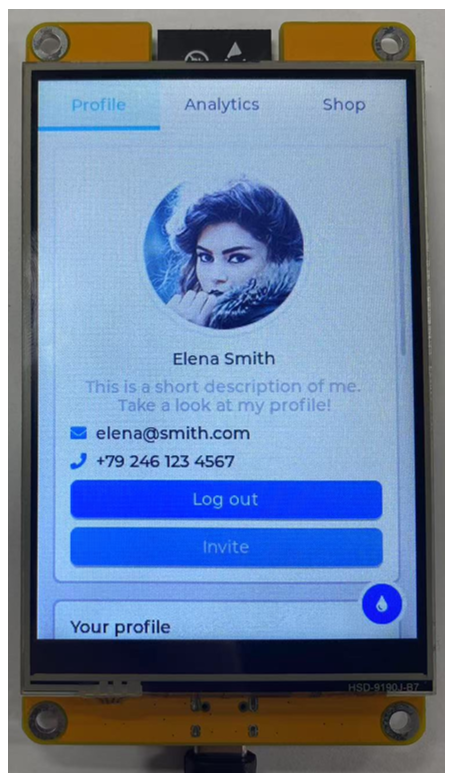
202    indev_drv.type = LV_INDEV_TYPE_POINTER;
203    indev_drv.read_cb = my_touchpad_read;
204    lv_indev_drv_register( &indev_drv );
205
206    /* Create simple label */
207    lv_obj_t *label = lv_label_create( lv_scr_act() );
208    lv_label_set_text( label, "Hello Ardino and LVGL!");
209    lv_obj_align( label, LV_ALIGN_CENTER, 0, 0 );
210
211    /* Try an example. See all the examples
212     * online: https://docs.lvgl.io/master/examples.html
213     * source codes: https://github.com/lvgl/lvgl/tree/e7f88efa5853128bf871dde335c0ca8da9eb7731/examples */
214     //lv_example_btn_1();
215
216     /*Or try out a demo. Don't forget to enable the demos in lv_conf.h. E.g. LV_USE_DEMOS_WIDGETS*/
217    lv_demo_widgets();
218    // lv_demo_benchmark();
219    // lv_demo_keypad_encoder();
220    // lv_demo_music();
221    // lv_demo_printer();
222    // lv_demo_stress();
223
224    Serial.println( "Setup done" );
225}
226
227void loop()
228{
229    lv_timer_handler(); /* let the GUI do its work */
230    delay( 5 );
231}
Click “Upload” to upload the code to Freenove ESP32 Display