Chapter 8 BLE
Project 8.1 BLE USART
Component List
Freenove ESP32 Display x 1
|
USB cable x1
|


Component Knowledge
BLE(Bluetooth Low Energy)
Low Energy Bluetooth (BLE) is a new feature introduced in the Bluetooth 4.0 specification, specifically designed for low-power devices and suitable for applications involving intermittent transmission of small amounts of data.
The BLE architecture follows a client-server model and consists of the following key components:
GATT (Generic Attribute Protocol): The foundational protocol for BLE communication, defining a hierarchical data structure of services and characteristics.
Service: A collection of data that performs a specific function or feature, containing one or more characteristics.
Characteristic: A specific data point within a service, consisting of a value and descriptors.
UUID: A 128-bit universally unique identifier used to distinguish services and characteristics.
BLE device can function simultaneously as a Peripheral (providing services) and a Central (connecting to peripherals). In this section, we will learn how to configure the Freenove_ESP32_Display as a peripheral device to provide services.
Circuit
Connect Freenove ESP32 Display to the computer with USB cable.

Sketch
Next, we download the code to Freenove_ESP32_Display to test. Open”Sketch_08.1_BLE_USART” folder under “Freenove_ESP32_DisplaySketch” and double-click “Sketch_08.1_BLE_USART.ino”.
Sketch_08.1_BLE_USART
The following is the program code:
 1/*
 2* @ File:   Sketch_08.1_BLE_USART.ino
 3* @ Author: [Zhentao Lin]
 4* @ Date:   [2025-06-14]
 5*/
 6
 7#include "BLEDevice.h"
 8#include "BLEServer.h"
 9#include "BLEUtils.h"
10#include "BLE2902.h"
11#include "String.h"
12
13BLECharacteristic *pCharacteristic;
14bool deviceConnected = false;
15uint8_t txValue = 0;
16long lastMsg = 0;
17String rxload="Test\n";
18
19#define SERVICE_UUID           "6E400001-B5A3-F393-E0A9-E50E24DCCA9E"
20#define CHARACTERISTIC_UUID_RX "6E400002-B5A3-F393-E0A9-E50E24DCCA9E"
21#define CHARACTERISTIC_UUID_TX "6E400003-B5A3-F393-E0A9-E50E24DCCA9E"
22
23class MyServerCallbacks: public BLEServerCallbacks {
24    void onConnect(BLEServer* pServer) {
25      deviceConnected = true;
26    };
27    void onDisconnect(BLEServer* pServer) {
28      deviceConnected = false;
29    }
30};
31
32class MyCallbacks: public BLECharacteristicCallbacks {
33    void onWrite(BLECharacteristic *pCharacteristic) {
34      String rxValue = pCharacteristic->getValue();
35      if (rxValue.length() > 0) {
36        rxload="";
37        for (int i = 0; i < rxValue.length(); i++){
38          rxload +=(char)rxValue[i];
39        }
40      }
41    }
42};
43
44void setupBLE(String BLEName){
45  const char *ble_name=BLEName.c_str();
46  BLEDevice::init(ble_name);
47  BLEServer *pServer = BLEDevice::createServer();
48  pServer->setCallbacks(new MyServerCallbacks());
49  BLEService *pService = pServer->createService(SERVICE_UUID);
50  pCharacteristic= pService->createCharacteristic(CHARACTERISTIC_UUID_TX,BLECharacteristic::PROPERTY_NOTIFY);
51  pCharacteristic->addDescriptor(new BLE2902());
52  BLECharacteristic *pCharacteristic = pService->createCharacteristic(CHARACTERISTIC_UUID_RX,BLECharacteristic::PROPERTY_WRITE);
53  pCharacteristic->setCallbacks(new MyCallbacks());
54  pService->start();
55  pServer->getAdvertising()->start();
56  Serial.println("Waiting a client connection to notify...");
57}
58
59void setup() {
60  Serial.begin(115200);
61  setupBLE("ESP32_BLE");
62}
63
64void loop() {
65  long now = millis();
66  if (now - lastMsg > 100) {
67    if (deviceConnected&&rxload.length()>0) {
68        Serial.println(rxload);
69        rxload="";
70    }
71    if(Serial.available()>0){
72        String str=Serial.readString();
73        const char *newValue=str.c_str();
74        pCharacteristic->setValue(newValue);
75        pCharacteristic->notify();
76    }
77    lastMsg = now;
78  }
79}
Code Explanation
Include the necessary header libraries.
1#include "BLEDevice.h"
2#include "BLEServer.h"
3#include "BLEUtils.h"
4#include "BLE2902.h"
5#include "String.h"
Define service UUID and characteristic UUID.
1#define SERVICE_UUID           "6E400001-B5A3-F393-E0A9-E50E24DCCA9E"
2#define CHARACTERISTIC_UUID_RX "6E400002-B5A3-F393-E0A9-E50E24DCCA9E"
3#define CHARACTERISTIC_UUID_TX "6E400003-B5A3-F393-E0A9-E50E24DCCA9E"
The MyServerCallbacks class handles device connection and disconnection events and updates the deviceConnected status.
1class MyServerCallbacks: public BLEServerCallbacks {
2    void onConnect(BLEServer* pServer) {
3      deviceConnected = true;
4    };
5    void onDisconnect(BLEServer* pServer) {
6      deviceConnected = false;
7    }
8};
The MyServerCallbacks class handles the received data and save them to the rxload string.
 1class MyCallbacks: public BLECharacteristicCallbacks {
 2    void onWrite(BLECharacteristic *pCharacteristic) {
 3      String rxValue = pCharacteristic->getValue();
 4      if (rxValue.length() > 0) {
 5        rxload="";
 6        for (int i = 0; i < rxValue.length(); i++){
 7          rxload +=(char)rxValue[i];
 8        }
 9      }
10    }
11};
Set the baud rate to 115200.
1Serial.begin(115200);
BLE Device Initialization, Service Creation, and Characteristic Setup
1setupBLE("ESP32_BLE");
The Loop function check the connection status and serial data every 100 milliseconds.
 1void loop() {
 2  long now = millis();
 3  if (now - lastMsg > 100) {
 4    if (deviceConnected&&rxload.length()>0) {
 5        Serial.println(rxload);
 6        rxload="";
 7    }
 8    if(Serial.available()>0){
 9        String str=Serial.readString();
10        const char *newValue=str.c_str();
11        pCharacteristic->setValue(newValue);
12        pCharacteristic->notify();
13    }
14    lastMsg = now;
15  }
16}
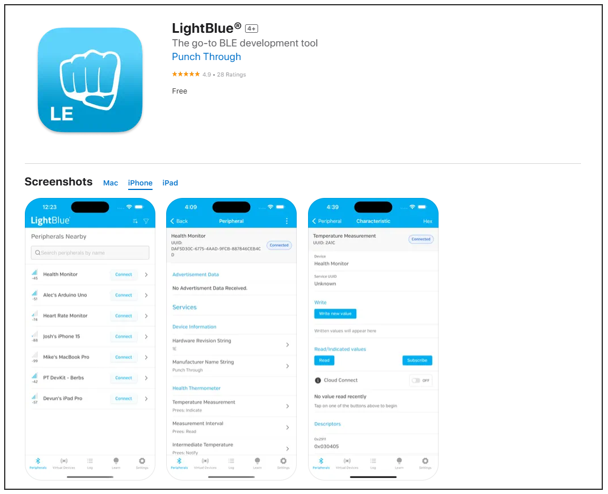
LightBlue
If you do not have this software installed on your phone, you can refer to this link:
https://apps.apple.com/us/app/lightblue/id557428110
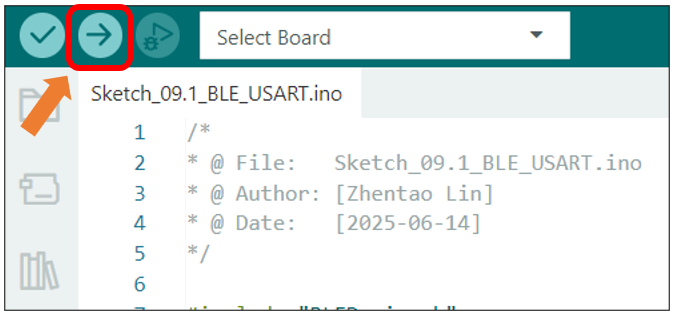
Click “Upload” to upload the code to Freenove ESP32 Display.
Note
This chapter does not involve the use of the screen. After the code for this chapter, the screen may not light up, which is normal and not a hardware malfunction. If you need to verify whether the screen is functioning properly, please refer to Chapter 10 for testing.
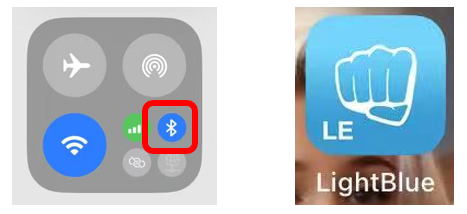
Turn ON Bluetooth on your phone, and open the LightBlue APP.
In the Scan page, swipe down to refresh the name of Bluetooth that the phone searches for. Click the Connection button of ESP32_BLE.
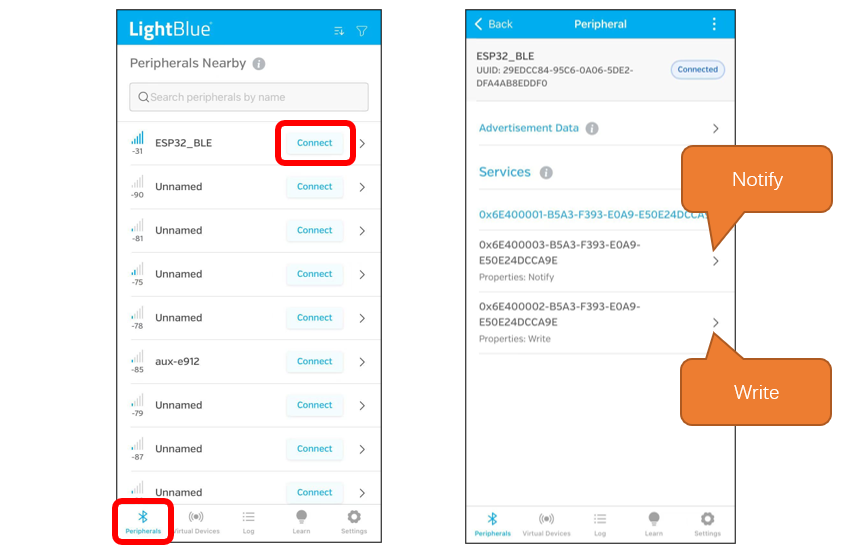
Receiving Data
Click Notify
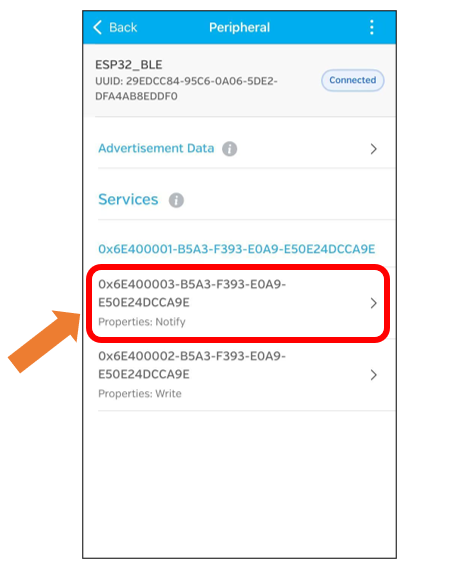
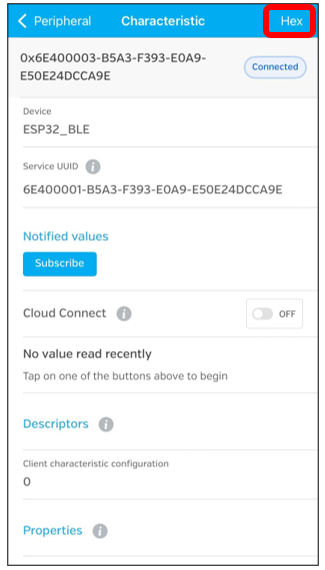
Click the top right corner to change the string type.
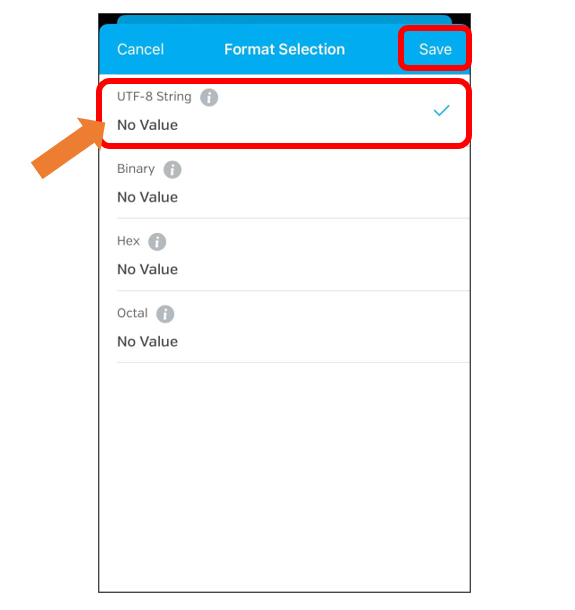
Select UTF-8 String, and click “Save”.
Click Subscribe
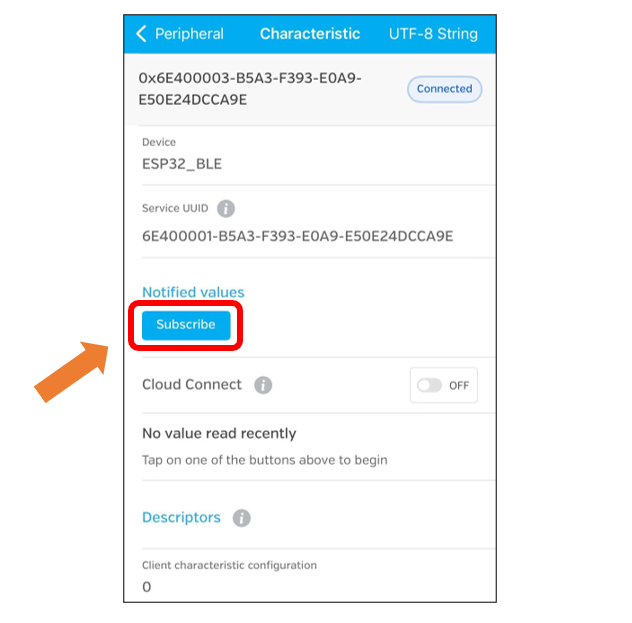
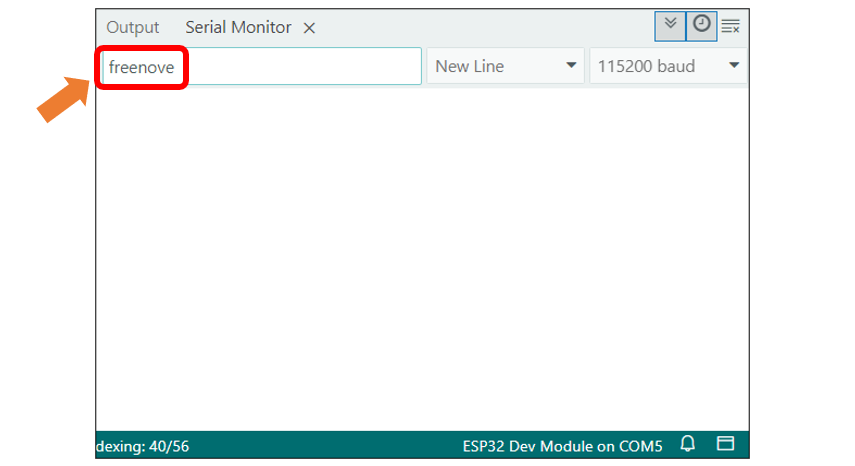
Send data on the serial monitor.
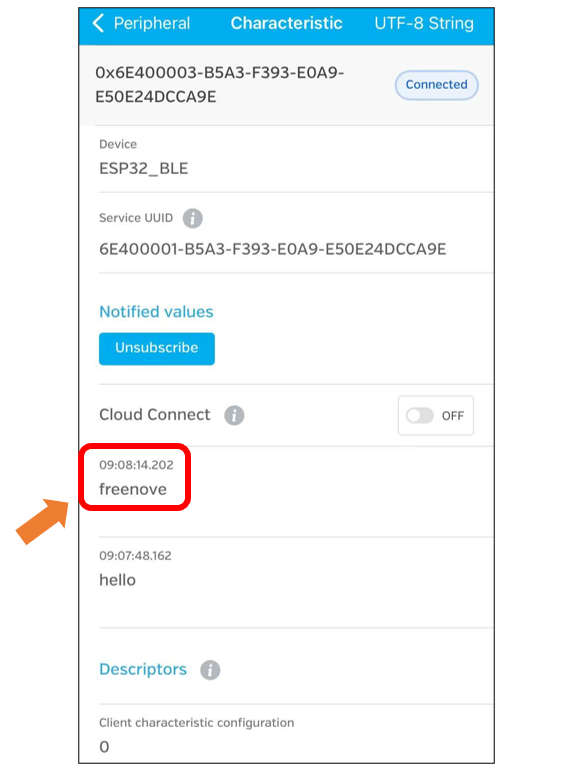
Data will be received on the LightBlue app.
Sending Data
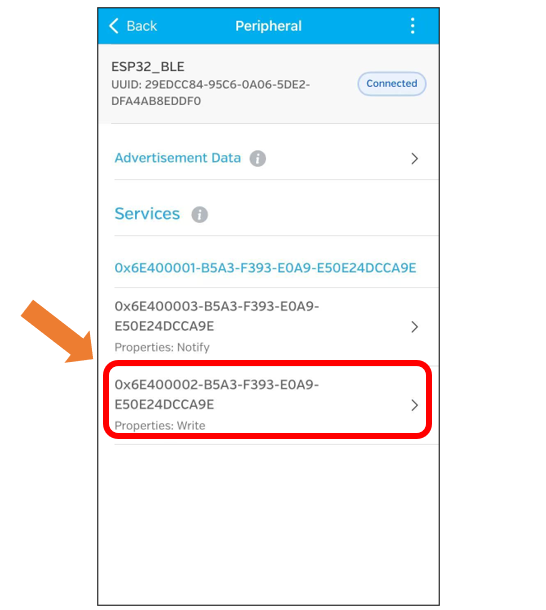
Click Write
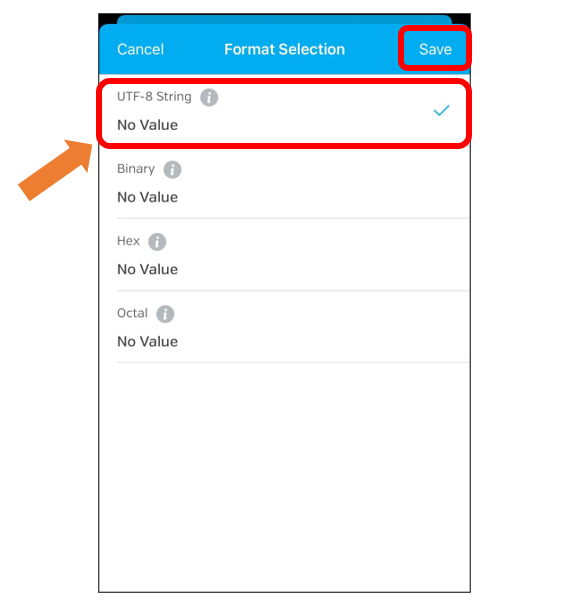
Click the top right corner to change the string type.
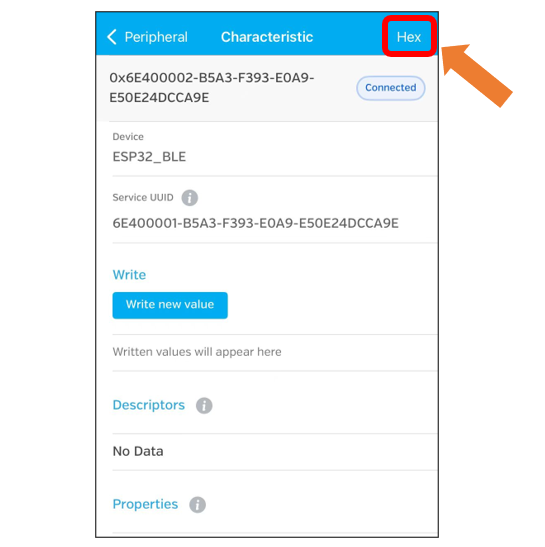
Select UTF-8 String and click “Save”.
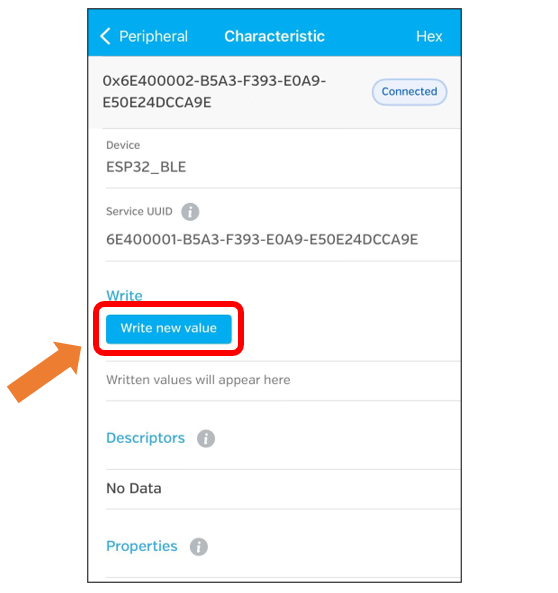
Click “Write new value”
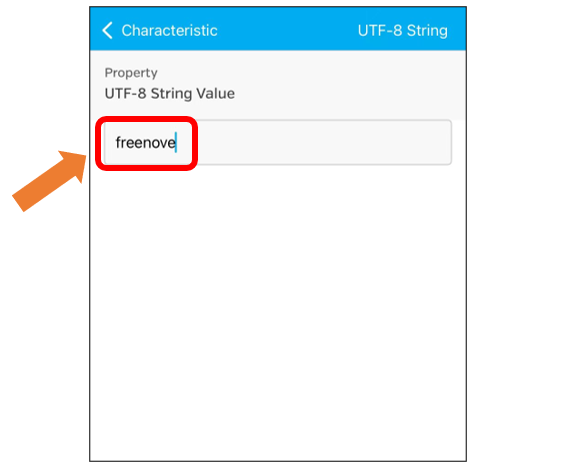
Enter the messages to send.
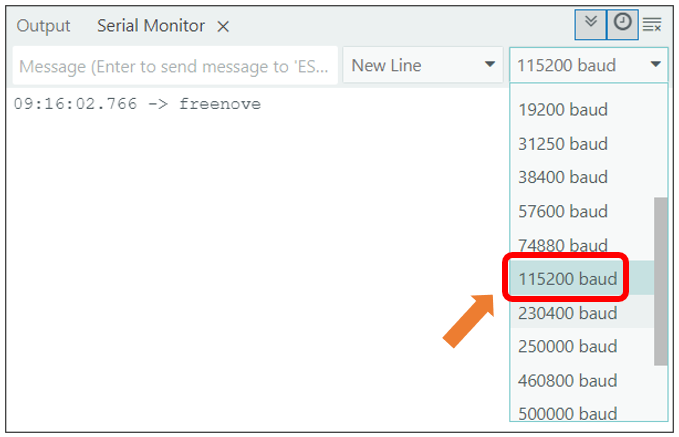
Set the baud rate to 115200, and the serial monitor will print the data received.
Project 8.2 BLE RGB
In this section we will control the RGB LED via BLE.
Component List
Freenove ESP32 Display x 1
|
USB cable x1
|
Circuit
Connect Freenove Freenove ESP32 Display to the computer using the USB cable.
Sketch
Next, we download the code to Freenove_ESP32_Display to test. Open “Sketch_08.2_BLE_RGB” folder under “Freenove_ESP32_DisplaySketch” and double-click “Sketch_08.2_BLE_RGB.ino”.
Sketch_08.2_BLE_RGB
The following is the program code:
  1/*
  2* @ File:   Sketch_08.2_BLE_RGB.ino
  3* @ Author: [Zhentao Lin]
  4* @ Date:   [2025-06-14]
  5*/
  6
  7#include "BLEDevice.h"
  8#include "BLEServer.h"
  9#include "BLEUtils.h"
 10#include "BLE2902.h"
 11#include "String.h"
 12
 13BLECharacteristic *pCharacteristic;
 14bool deviceConnected = false;
 15uint8_t txValue = 0;
 16long lastMsg = 0;
 17String rxload = "Test\n";
 18
 19#define SERVICE_UUID "6E400001-B5A3-F393-E0A9-E50E24DCCA9E"
 20#define CHARACTERISTIC_UUID_RX "6E400002-B5A3-F393-E0A9-E50E24DCCA9E"
 21#define CHARACTERISTIC_UUID_TX "6E400003-B5A3-F393-E0A9-E50E24DCCA9E"
 22
 23#define RED_PIN 22
 24#define GREEN_PIN 16
 25#define BLUE_PIN 17
 26
 27void rgbInit(void) {
 28  pinMode(RED_PIN, OUTPUT);
 29  pinMode(GREEN_PIN, OUTPUT);
 30  pinMode(BLUE_PIN, OUTPUT);
 31}
 32
 33void setRGB(bool redLevel, bool greenLevel, bool blueLevel) {
 34  digitalWrite(RED_PIN, !redLevel);
 35  digitalWrite(GREEN_PIN, !greenLevel);
 36  digitalWrite(BLUE_PIN, !blueLevel);
 37}
 38
 39class MyServerCallbacks : public BLEServerCallbacks {
 40  void onConnect(BLEServer *pServer) {
 41    deviceConnected = true;
 42  };
 43  void onDisconnect(BLEServer *pServer) {
 44    deviceConnected = false;
 45  }
 46};
 47
 48class MyCallbacks : public BLECharacteristicCallbacks {
 49  void onWrite(BLECharacteristic *pCharacteristic) {
 50    String rxValue = pCharacteristic->getValue();
 51    if (rxValue.length() > 0) {
 52      rxload = "";
 53      for (int i = 0; i < rxValue.length(); i++) {
 54        rxload += (char)rxValue[i];
 55      }
 56    }
 57  }
 58};
 59
 60void setupBLE(String BLEName) {
 61  const char *ble_name = BLEName.c_str();
 62  BLEDevice::init(ble_name);
 63  BLEServer *pServer = BLEDevice::createServer();
 64  pServer->setCallbacks(new MyServerCallbacks());
 65  BLEService *pService = pServer->createService(SERVICE_UUID);
 66  pCharacteristic = pService->createCharacteristic(CHARACTERISTIC_UUID_TX, BLECharacteristic::PROPERTY_NOTIFY);
 67  pCharacteristic->addDescriptor(new BLE2902());
 68  BLECharacteristic *pCharacteristic = pService->createCharacteristic(CHARACTERISTIC_UUID_RX, BLECharacteristic::PROPERTY_WRITE);
 69  pCharacteristic->setCallbacks(new MyCallbacks());
 70  pService->start();
 71  pServer->getAdvertising()->start();
 72  Serial.println("Waiting a client connection to notify...");
 73}
 74
 75void setup() {
 76  Serial.begin(115200);
 77  rgbInit();
 78  setRGB(0, 0, 0);
 79  setupBLE("ESP32_BLE");
 80}
 81
 82void loop() {
 83  long now = millis();
 84  if (now - lastMsg > 100) {
 85    if (deviceConnected && rxload.length() > 0) {
 86      Serial.println(rxload);
 87      if (strncmp(rxload.c_str(), "red_on", 6) == 0) {
 88        setRGB(1, 0, 0);
 89      } else if (strncmp(rxload.c_str(), "red_off", 7) == 0) {
 90        setRGB(0, 0, 0);
 91      } else if (strncmp(rxload.c_str(), "green_on", 8) == 0) {
 92        setRGB(0, 1, 0);
 93      } else if (strncmp(rxload.c_str(), "green_off", 9) == 0) {
 94        setRGB(0, 0, 0);
 95      } else if (strncmp(rxload.c_str(), "blue_on", 7) == 0) {
 96        setRGB(0, 0, 1);
 97      } else if (strncmp(rxload.c_str(), "blue_off", 8) == 0) {
 98        setRGB(0, 0, 0);
 99      }
100      rxload = "";
101    }
102    if (Serial.available() > 0) {
103      String str = Serial.readString();
104      const char *newValue = str.c_str();
105      pCharacteristic->setValue(newValue);
106      pCharacteristic->notify();
107    }
108    lastMsg = now;
109  }
110}
Code Explanation
Include the necessary header files.
1#include "BLEDevice.h"
2#include "BLEServer.h"
3#include "BLEUtils.h"
4#include "BLE2902.h"
5#include "String.h"
Define Service UUID and Characteristic UUID.
1#define SERVICE_UUID "6E400001-B5A3-F393-E0A9-E50E24DCCA9E"
2#define CHARACTERISTIC_UUID_RX "6E400002-B5A3-F393-E0A9-E50E24DCCA9E"
3#define CHARACTERISTIC_UUID_TX "6E400003-B5A3-F393-E0A9-E50E24DCCA9E"
Define pins for the RGB LED.
1#define RED_PIN 22
2#define GREEN_PIN 16
3#define BLUE_PIN 17
The MyServerCallbacks class handles device connection and disconnection events and updates the deviceConnected status.
1class MyServerCallbacks : public BLEServerCallbacks {
2  void onConnect(BLEServer *pServer) {
3    deviceConnected = true;
4  };
5  void onDisconnect(BLEServer *pServer) {
6    deviceConnected = false;
7  }
8};
The MyCallbacks class handles the receiving data and save them to the rxload string.
 1class MyCallbacks : public BLECharacteristicCallbacks {
 2  void onWrite(BLECharacteristic *pCharacteristic) {
 3    String rxValue = pCharacteristic->getValue();
 4    if (rxValue.length() > 0) {
 5      rxload = "";
 6      for (int i = 0; i < rxValue.length(); i++) {
 7        rxload += (char)rxValue[i];
 8      }
 9    }
10  }
11};
Set the baud rate to 115200
1Serial.begin(115200);
Initialize RGB LED setting, initialize the BLE device, create services, and set up characteristics.
1rgbInit();
2setRGB(0, 0, 0);
3setupBLE("ESP32_BLE");
The Loop function checks the sending command every 100 milliseconds.
 1void loop() {
 2  long now = millis();
 3  if (now - lastMsg > 100) {
 4    if (deviceConnected && rxload.length() > 0) {
 5      Serial.println(rxload);
 6      if (strncmp(rxload.c_str(), "red_on", 6) == 0) {
 7        setRGB(1, 0, 0);
 8      } else if (strncmp(rxload.c_str(), "red_off", 7) == 0) {
 9        setRGB(0, 0, 0);
10      } else if (strncmp(rxload.c_str(), "green_on", 8) == 0) {
11        setRGB(0, 1, 0);
12      } else if (strncmp(rxload.c_str(), "green_off", 9) == 0) {
13        setRGB(0, 0, 0);
14      } else if (strncmp(rxload.c_str(), "blue_on", 7) == 0) {
15        setRGB(0, 0, 1);
16      } else if (strncmp(rxload.c_str(), "blue_off", 8) == 0) {
17        setRGB(0, 0, 0);
18      }
19      rxload = "";
20    }
21    if (Serial.available() > 0) {
22      String str = Serial.readString();
23      const char *newValue = str.c_str();
24      pCharacteristic->setValue(newValue);
25      pCharacteristic->notify();
26    }
27    lastMsg = now;
28  }
29}
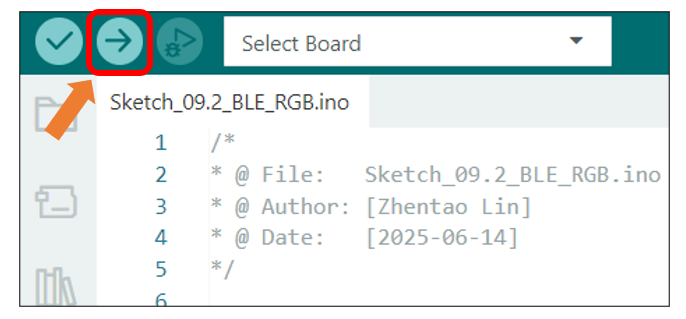
Click “Upload” to upload the code to Freenove ESP32 Display.
Note
This chapter does not involve the use of the screen. After the code for this chapter, the screen may not light up, which is normal and not a hardware malfunction. If you need to verify whether the screen is functioning properly, please refer to Chapter 10 for testing.
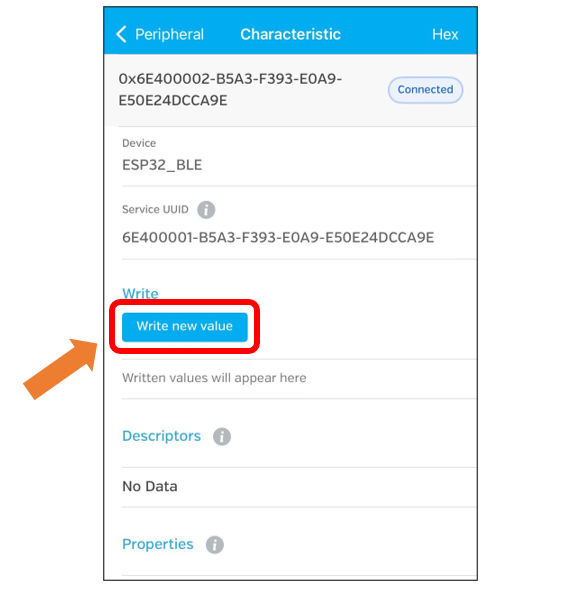
Click “Write new value”
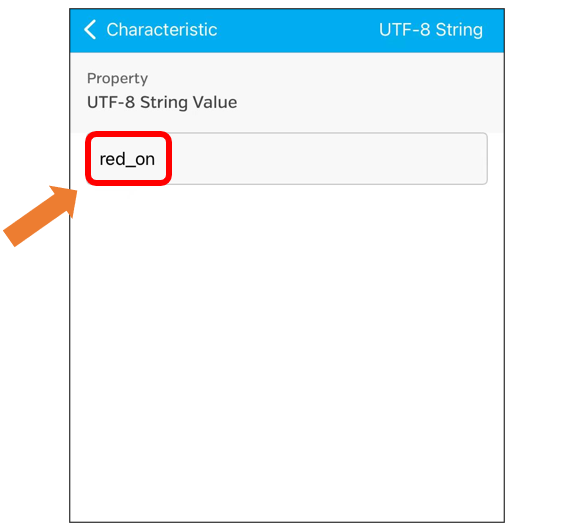
Enter the messages to send. Here we take “red_on” as an example.
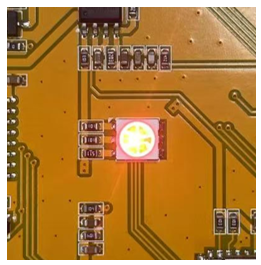
The RGB LED on the Freenove ESP32 Display emits red light.
You can also use the following instructions to control the RGB LED:
red_off: red light off
green_on: green light on
green_off: green light off
blue_on: blue light on
blue_off: blue light off