8. Chapter Potentiometer & LED
Earlier we learned how to use ADC and PWM. In this chapter, we learn to control the brightness of an LED by using a potentiometer.
8.1. Project Soft Light
In this project, we will make a soft light. We will use an ADC Module to read ADC values of a potentiometer and map it to duty cycle ratio of the PWM used to control the brightness of an LED. Then you can change the brightness of an LED by adjusting the potentiometer.
8.1.1. Component List
|
|
Rotary potentiometer x1
|
Resistor 10kΩ x2 |
ADC module x1 (Only one)
|
LED x1 |
Jumper Wire M/M x17 |
Resistor 220Ω x1 |







8.1.2. Circuit with ADS7830
Schematic diagram
|
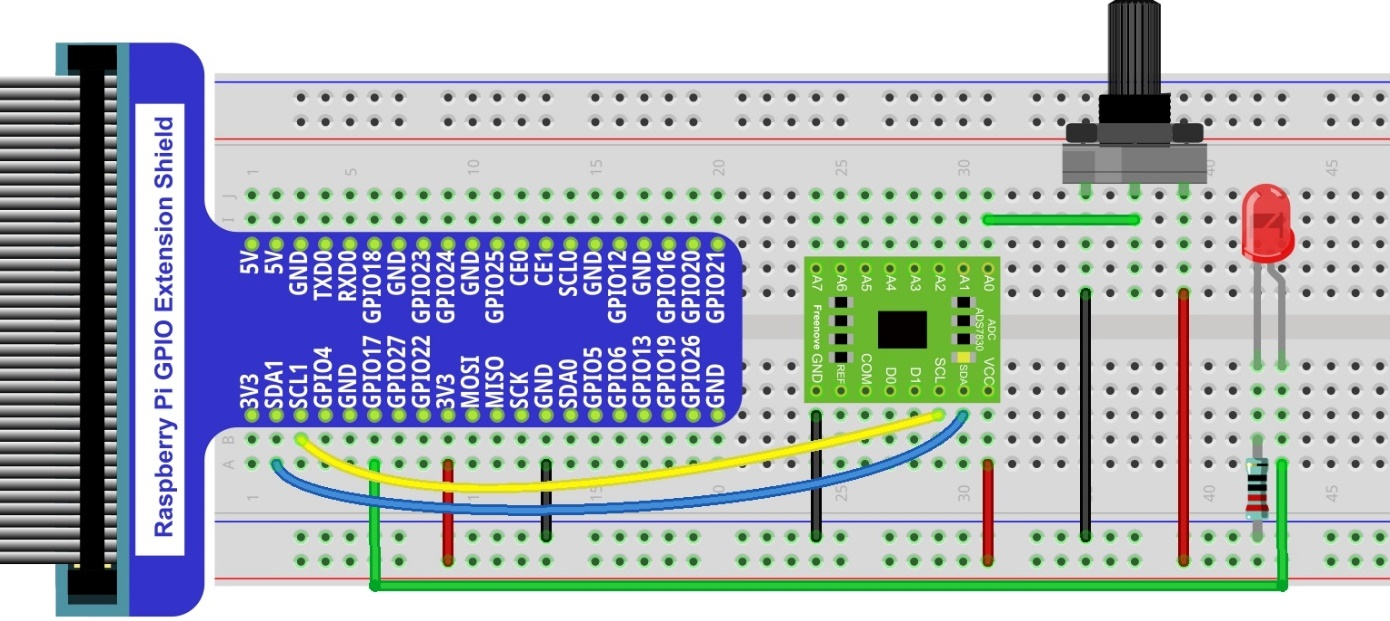
Hardware connection. If you need any support,please feel free to contact us via:
|

8.1.3. Circuit with PCF8591
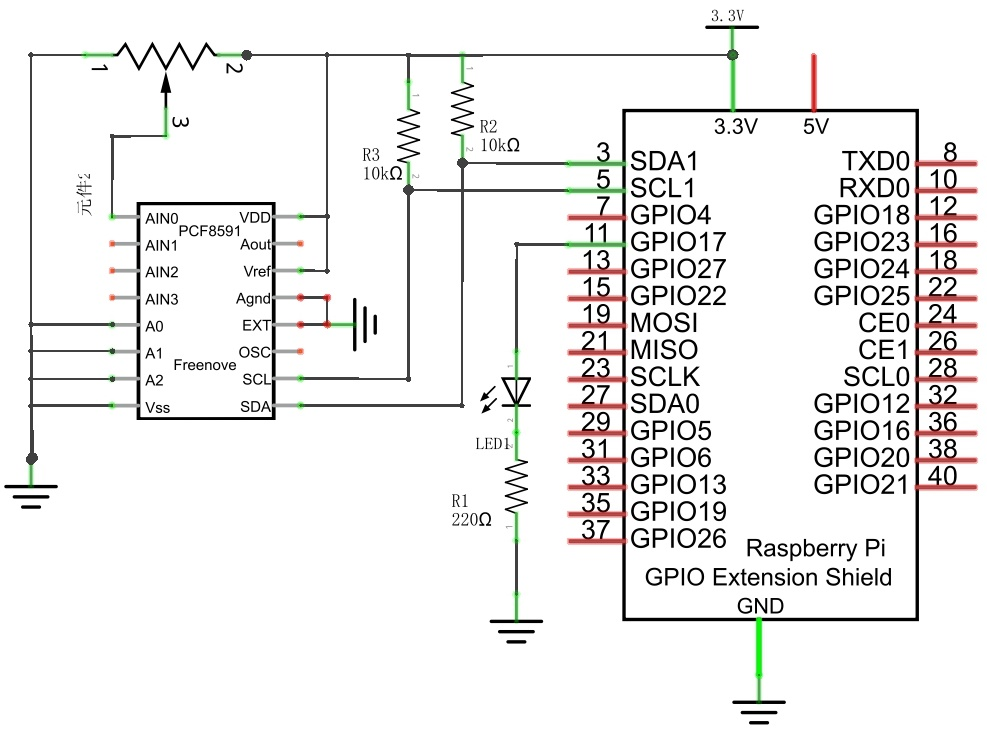
Schematic diagram
|
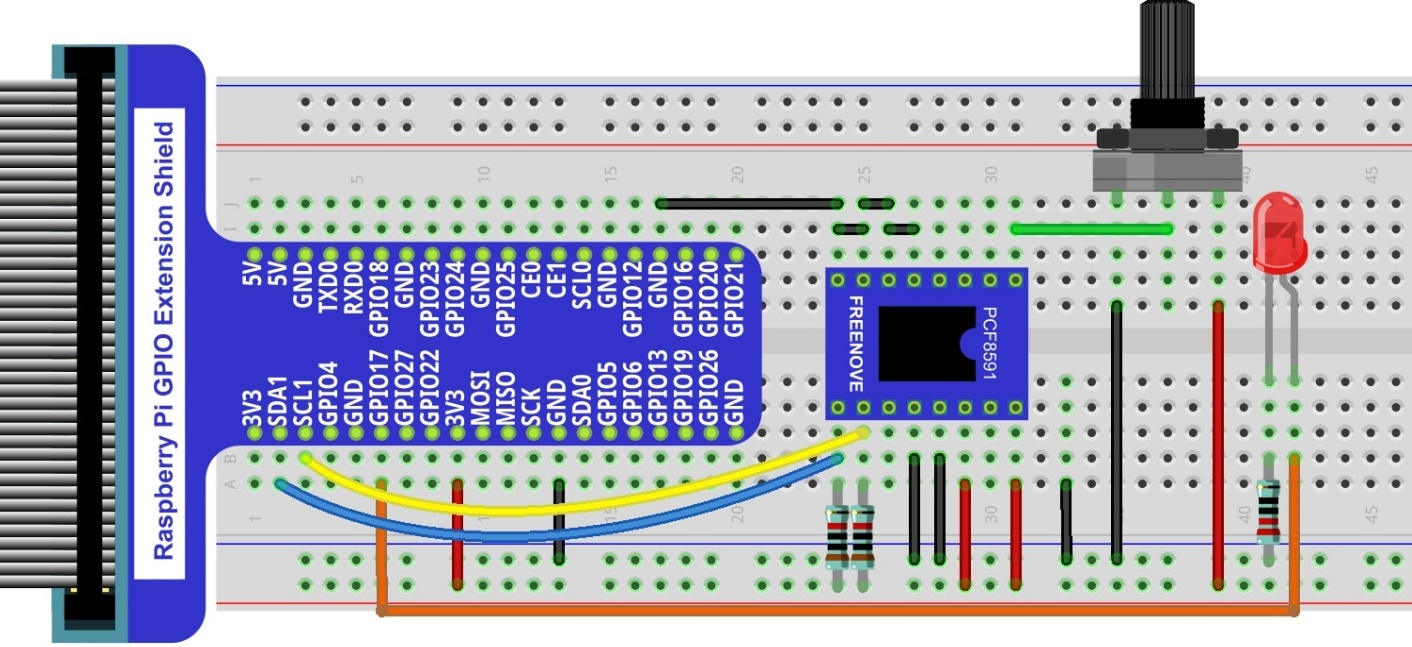
Hardware connection.
|
8.1.4. Code
8.1.4.1. C Code Softlight
If you did not configure I2C, please refer to Chapter 7. If you did, please move on.
First, observe the project result, and then learn about the code in detail.
Hint
If you have any concerns, please contact us via: support@freenove.com
Use
cdcommand to enter 08.1.1_Softlight directory of C code.
$ cd ~/Freenove_Kit/Code/C_Code/08.1.1_Softlight
Use following command to compile “Softlight.cpp” and generate executable file
Softlight.
$ g++ Softlight.cpp -o Softlight -lwiringPi -lADCDevice
Then run the generated file
Softlight.
$ sudo ./Softlight
After the program is executed, adjusting the potentiometer will display the voltage values of the potentiometer in the Terminal window and the converted digital quantity. As a consequence, the brightness of LED will be changed.
The following is the code:
 1/**********************************************************************
 2* Filename    : Softlight.cpp
 3* Description : Use potentiometer to control LED
 4* Author      : www.freenove.com
 5* modification: 2020/03/07
 6**********************************************************************/
 7#include <wiringPi.h>
 8#include <stdio.h>
 9#include <softPwm.h>
10#include <ADCDevice.hpp>
11
12#define ledPin 0
13
14ADCDevice *adc;  // Define an ADC Device class object
15
16int main(void){
17    adc = new ADCDevice();
18    printf("Program is starting ... \n");
19
20    if(adc->detectI2C(0x48)){    // Detect the pcf8591.
21        delete adc;                // Free previously pointed memory
22        adc = new PCF8591();    // If detected, create an instance of PCF8591.
23    }
24    else if(adc->detectI2C(0x4b)){// Detect the ads7830
25        delete adc;               // Free previously pointed memory
26        adc = new ADS7830();      // If detected, create an instance of ADS7830.
27    }
28    else{
29        printf("No correct I2C address found, \n"
30        "Please use command 'i2cdetect -y 1' to check the I2C address! \n"
31        "Program Exit. \n");
32        return -1;
33    }
34    wiringPiSetup();
35    softPwmCreate(ledPin,0,100);
36    while(1){
37        int adcValue = adc->analogRead(0);    //read analog value of A0 pin
38        softPwmWrite(ledPin,adcValue*100/255);    // Mapping to PWM duty cycle
39        float voltage = (float)adcValue / 255.0 * 3.3;  // Calculate voltage
40        printf("ADC value : %d  ,\tVoltage : %.2fV\n",adcValue,voltage);
41        delay(30);
42    }
43    return 0;
44}
In the code, read the ADC value of potentiometer and map it to the duty cycle of PWM to control LED brightness.
1int adcValue = adc->analogRead(0);    //read analog value of A0 pin
2softPwmWrite(ledPin,adcValue*100/255);    // Mapping to PWM duty cycle