17. Chapter 74HC595 & Bar Graph LED
We have used LED Bar Graph to make a flowing water light, in which 10 GPIO ports of RPi are occupied. More GPIO ports mean that more peripherals can be connected to RPi, so GPIO resource is very precious. Can we make flowing water light with less GPIO ports? In this chapter, we will learn a component, 74HC595, which can achieve the target.
17.1. Project FollowLight
Now let us learn how to use the 74HC595 IC Chip to make a flowing water light using less GPIO.
17.1.1. Component List
|
Jumper Wires x17 |
||
74HC595 x1 |
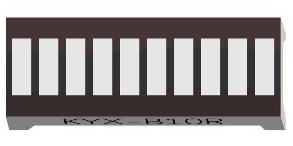
Bar Graph LED x1 |
Resistor 220Ω x8 |
|



17.1.2. Component knowledge
A 74HC595 chip is used to convert serial data into parallel data. A 74HC595 chip can convert the serial data of one byte into 8 bits, and send its corresponding level to each of the 8 ports correspondingly. With this characteristic, the 74HC595 chip can be used to expand the IO ports of a Raspberry Pi. At least 3 ports on the RPI board are required to control the 8 ports of the 74HC595 chip.

The ports of the 74HC595 chip are described as follows:
Pin name |
Pin number |
Description |
|---|---|---|
Q0-Q7 |
15, 1-7 |
Parallel Data Output |
VCC |
16 |
The Positive Electrode of the Power Supply, the Voltage is 2~6V |
GND |
8 |
The Negative Electrode of Power Supply |
DS |
14 |
Serial Data Input |
OE |
13 |
Enable Output, When this pin is in high level, Q0-Q7 is in high resistance state When this pin is in low level, Q0-Q7 is in output mode |
ST_CP |
12 |
Parallel Update Output: when its electrical level is rising, it will update the parallel data output. |
SH_CP |
11 |
Serial Shift Clock: when its electrical level is rising, it will update the parallel data output. |
MR |
10 |
Remove Shift Register: When this pin is in low level, the content in shift register will be cleared. |
Q7 |
9 |
Serial Data Output: it can be connected to more 74HC595 chips in series. |
See also
For more details, please refer to the datasheet on the 74HC595 chip.
17.1.3. Circuit
Schematic diagram
|
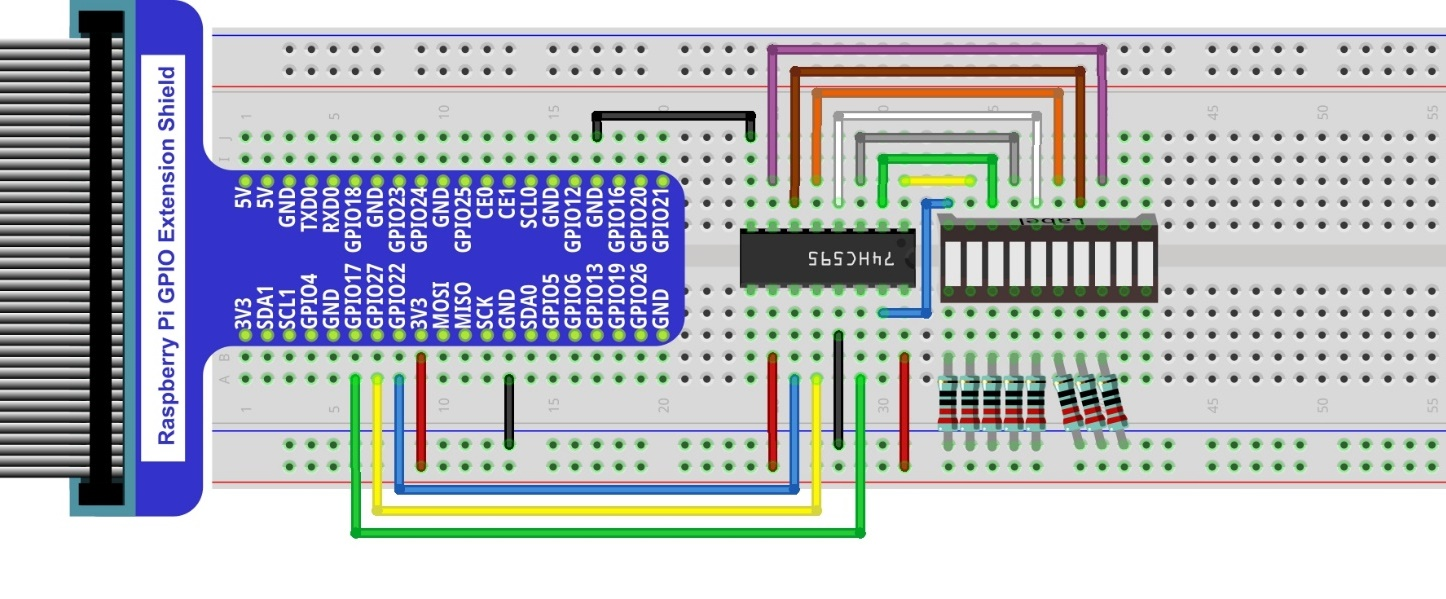
Hardware connection. If you need any support,please feel free to contact us via:
|

17.1.4. Code
In this project we will make a flowing water light with a 74HC595 chip to learn about its functions.
17.1.4.1. Python Code LightWater02
First, observe the project result, and then learn about the code in detail.
Hint
If you have any concerns, please contact us via: support@freenove.com
Use cd command to enter 17.1.1_LightWater02 directory of Python code.
$ cd ~/Freenove_Kit/Code/Python_GPIOZero_Code/17.1.1_LightWater02
Use python command to execute Python code “LightWater02.py”.
$ python LightWater02.py
After the program is executed, you will see that Bar Graph LED starts with the flowing water pattern flashing from left to right and then back from right to left.
The following is the program code:
 1#!/usr/bin/env python3
 2#############################################################################
 3# Filename    : LightWater02.py
 4# Description : Control LED with 74HC595
 5# Author      : www.freenove.com
 6# modification: 2023/05/12
 7########################################################################
 8from gpiozero import OutputDevice
 9import time
10# Defines the data bit that is transmitted preferentially in the shiftOut function.
11LSBFIRST = 1
12MSBFIRST = 2
13# define the pins for 74HC595
14dataPin   = OutputDevice(17)      # DS Pin of 74HC595(Pin14)
15latchPin  = OutputDevice(27)      # ST_CP Pin of 74HC595(Pin12)
16clockPin  = OutputDevice(22)      # CH_CP Pin of 74HC595(Pin11)
17
18# shiftOut function, use bit serial transmission.
19def shiftOut(order,val):
20    for i in range(0,8):
21        clockPin.off()
22        if(order == LSBFIRST):
23            dataPin.on() if (0x01&(val>>i)==0x01) else dataPin.off()
24        elif(order == MSBFIRST):
25            dataPin.on() if (0x80&(val<<i)==0x80) else dataPin.off()
26        clockPin.on()
27
28def loop():
29    while True:
30        x=0x01
31        for i in range(0,8):
32            latchPin.off()# Output low level to latchPin
33            shiftOut(LSBFIRST,x) # Send serial data to 74HC595
34            latchPin.on()   # Output high level to latchPin, and 74HC595 will update the data to the parallel output port.
35            x<<=1 # make the variable move one bit to left once, then the bright LED move one step to the left once.
36            time.sleep(0.1)
37        x=0x80
38        for i in range(0,8):
39            latchPin.off()
40            shiftOut(LSBFIRST,x)
41            latchPin.on()
42            x>>=1
43            time.sleep(0.1)
44
45def destroy():
46    dataPin.close()
47    latchPin.close()
48    clockPin.close()
49
50if __name__ == '__main__': # Program entrance
51    print ('Program is starting...' )
52    try:
53        loop()
54    except KeyboardInterrupt:  # Press ctrl-c to end the program.
55        destroy()
56        print("Ending program")
Import the OutputDevice class that controls the 74HC595 chip from the gpiozero library.
1from gpiozero import OutputDevice
Create the OutputDevice class for controlling the 74HC595 chip.
1dataPin   = OutputDevice(17)      # DS Pin of 74HC595(Pin14)
2latchPin  = OutputDevice(27)      # ST_CP Pin of 74HC595(Pin12)
3clockPin  = OutputDevice(22)      # CH_CP Pin of 74HC595(Pin11)
In the code, we define a shiftOut() function, which is used to output values with bits in order, where the dPin for the data pin, cPin for the clock and order for the priority bit flag (high or low). This function conforms to the operational modes of the 74HC595. LSBFIRST and MSBFIRST are two different flow directions.
1def shiftOut(order,val):
2    for i in range(0,8):
3        clockPin.off()
4        if(order == LSBFIRST):
5            dataPin.on() if (0x01&(val>>i)==0x01) else dataPin.off()
6        elif(order == MSBFIRST):
7            dataPin.on() if (0x80&(val<<i)==0x80) else dataPin.off()
8        clockPin.on()
In the loop() function, we use two cycles to achieve the action goal. First, define a variable x=0x01, binary 00000001. When it is transferred to the output port of 74HC595, the low bit outputs high level, then an LED turns ON. Next, x is shifted one bit, when x is transferred to the output port of 74HC595 once again, the LED that turns ON will be shifted. Repeat the operation, over and over and the effect of a flowing water light will be visible. If the direction of the shift operation for x is different, the flowing direction is different.
 1def loop():
 2    while True:
 3        x=0x01
 4        for i in range(0,8):
 5            latchPin.off()# Output low level to latchPin
 6            shiftOut(LSBFIRST,x) # Send serial data to 74HC595
 7            latchPin.on()   # Output high level to latchPin, and 74HC595 will update the data to the parallel output port.
 8            x<<=1 # make the variable move one bit to left once, then the bright LED move one step to the left once.
 9            time.sleep(0.1)
10        x=0x80
11        for i in range(0,8):
12            latchPin.off()
13            shiftOut(LSBFIRST,x)
14            latchPin.on()
15            x>>=1
16            time.sleep(0.1)
For more information about the methods used by the OutputDevice class in the GPIO Zero library,please refer to: https://gpiozero.readthedocs.io/en/stable/api_output.html#outputdevice