25. Chapter Attitude Sensor MPU6050
In this chapter, we will learn about a MPU6050 Attitude sensor, which integrates an Accelerometer and Gyroscope.
25.1. Project Read a MPU6050 Sensor Module
In this project, we will read Acceleration and Gyroscope Data of the MPU6050 Sensor.
25.1.1. Component List
|
Jumper Wires x4 |
MPU6050 |
|

25.1.2. Component knowledge
25.1.2.1. MPU6050
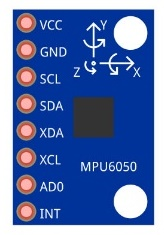
MPU6050 Sensor Module is a complete 6-axis Motion Tracking Device. It combines a 3-axis Gyroscope, a 3-axis Accelerometer and a DMP (Digital Motion Processor) all in a small package. The settings of the Accelerometer and Gyroscope of MPU6050 can be changed. A precision wide range digital temperature sensor is also integrated to compensate data readings for changes in temperature, and temperature values can also be read. The MPU6050 Module follows the I2C communication protocol and the default address is 0x68.
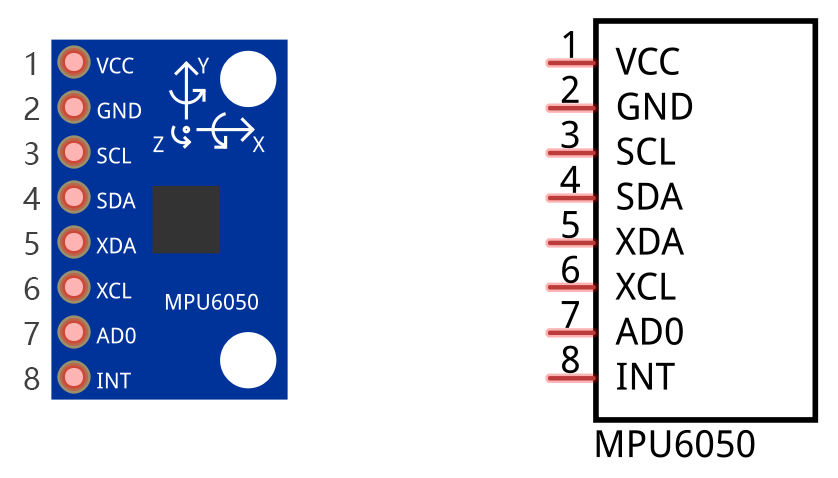
The port description of the MPU6050 Module is as follows:
Pin name |
Pin number |
Description |
|---|---|---|
VCC |
1 |
Positive pole of power supply with voltage 5V |
GND |
2 |
Negative pole of power supply |
SCL |
3 |
I2C communication clock pin |
SDA |
4 |
I2C communication data pin |
XDA |
5 |
I2C host data pin which can be connected to other devices. |
XCL |
6 |
I2C host clock pin which can be connected to other devices. |
AD0 |
7 |
I2C address bit control pin. Low level: the device address is 0x68 High level: the device address is 0x69 |
INT |
8 |
Output interrupt pin |
For more detail, please refer to the MPU6050 datasheet.
MPU6050 is widely used to assist with balancing vehicles, robots and aircraft, mobile phones and other products which require stability to control stability and attitude or which need to sense same.
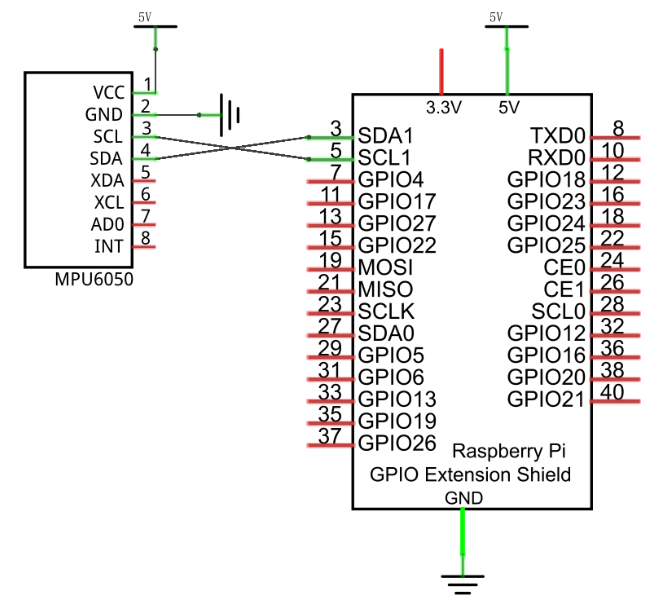
Schematic diagram
|
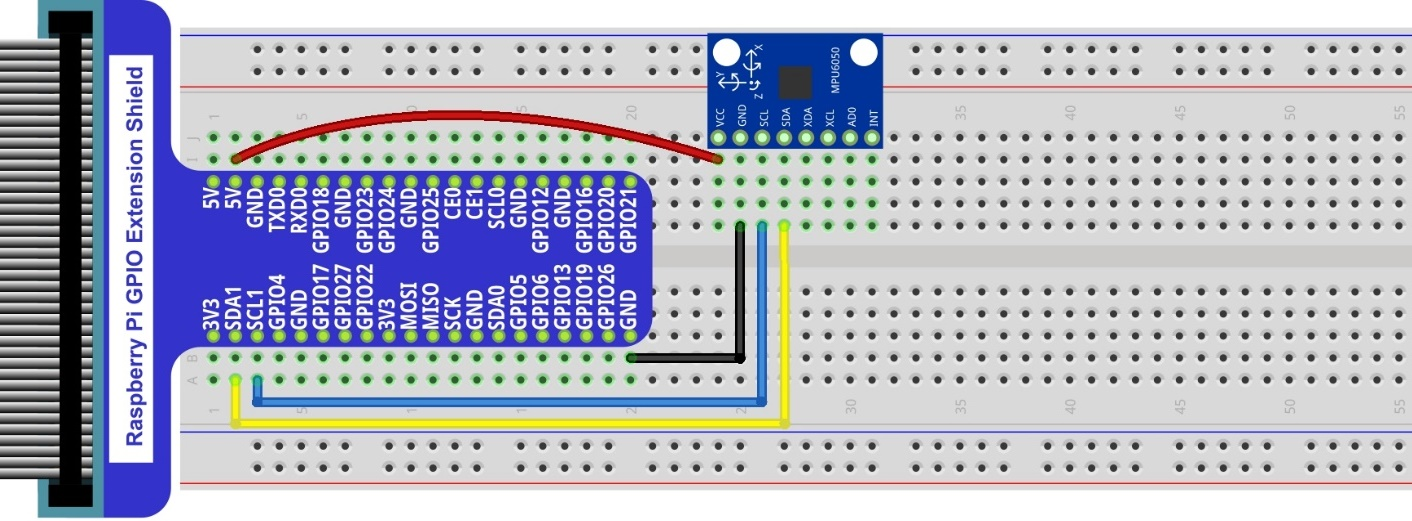
Hardware connection. If you need any support,please feel free to contact us via:
|
25.1.3. Code
In this project, we will read the acceleration data and gyroscope data of MPU6050, and print them out.
25.1.3.1. Python Code MPU6050RAW
First, observe the project result, and then learn about the code in detail.
Hint
If you have any concerns, please contact us via: support@freenove.com
Use
cdcommand to enter 25.1.1_MPU6050RAW directory of Python code.
$ cd ~/Freenove_Kit/Code/Python_GPIOZero_Code/25.1.1_MPU6050
Use Python command to execute code
MPU6050RAW.py.
$ python MPU6050RAW.py
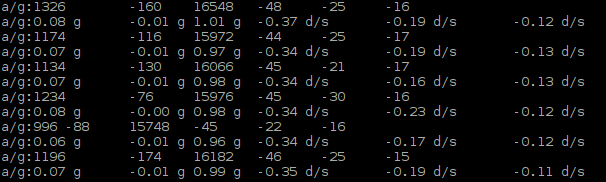
After the program is executed, the Terminal will display active accelerometer and gyroscope data of the MPU6050, as well as the conversion to gravity acceleration and angular velocity as units of data. As shown in the following figure:
The following is the program code:
 1#!/usr/bin/env python3
 2########################################################################
 3# Filename    : MPU6050RAW.py
 4# Description : Read data of MPU6050.
 5# auther      : www.freenove.com
 6# modification: 2019/12/28
 7########################################################################
 8import MPU6050
 9import time
10
11mpu = MPU6050.MPU6050()     # instantiate a MPU6050 class object
12accel = [0]*3               # define an arry to store accelerometer data
13gyro = [0]*3                # define an arry to store gyroscope data
14def setup():
15    mpu.dmp_initialize()    # initialize MPU6050
16
17def loop():
18    while(True):
19        accel = mpu.get_acceleration()      # get accelerometer data
20        gyro = mpu.get_rotation()           # get gyroscope data
21        print("a/g:%d\t%d\t%d\t%d\t%d\t%d "%(accel[0],accel[1],accel[2],gyro[0],gyro[1],gyro[2]))
22        print("a/g:%.2f g\t%.2f g\t%.2f g\t%.2f d/s\t%.2f d/s\t%.2f d/s"%(accel[0]/16384.0,accel[1]/16384.0,
23            accel[2]/16384.0,gyro[0]/131.0,gyro[1]/131.0,gyro[2]/131.0))
24        time.sleep(0.1)
25
26if __name__ == '__main__':     # Program entrance
27    print("Program is starting ... ")
28    setup()
29    try:
30        loop()
31    except KeyboardInterrupt:  # Press ctrl-c to end the program.
32        pass
33
A module “MPU6050.py” is used in the code. The module includes a class used to operate MPU6050. When used, first initiate an object.
1mpu = MPU6050.MPU6050()
In the setup function, the MPU6050 is initialized.
1def setup():
2    mpu.dmp_initialize()
In the loop function, read the original data of MPU6050, display them and then convert the original data into the corresponding acceleration and angular velocity values, then display the converted data out.
1def loop():
2    while(True):
3        accel = mpu.get_acceleration()      # get accelerometer data
4        gyro = mpu.get_rotation()           # get gyroscope data
5        print("a/g:%d\t%d\t%d\t%d\t%d\t%d "%(accel[0],accel[1],accel[2],gyro[0],gyro[1],gyro[2]))
6        print("a/g:%.2f g\t%.2f g\t%.2f g\t%.2f d/s\t%.2f d/s\t%.2f d/s"%(accel[0]/16384.0,accel[1]/16384.0,
7            accel[2]/16384.0,gyro[0]/131.0,gyro[1]/131.0,gyro[2]/131.0))
8        time.sleep(0.1)
About class MPU6050:
- Class MPU6050
This is a class library used to operate MPU6050, which can directly read and set MPU6050. Here are some member functions:
def __init__ (self, a_bus=1, a_address=C.MPU6050_DEFAULT_ADDRESS,
a_xAOff=None, a_yAOff=None, a_zAOff=None, a_xGOff=None,
a_yGOff=None, a_zGOff=None, a_debug=False):
Constructor
def dmp_initialize (self):
Initialization function, used to wake up MPU6050. Range of accelerometer is ±2g and range of gyroscope is ±250 degrees/sec.
def get_acceleration (self): & def get_rotation (self):
Get the original data of accelerometer and gyroscope.
For details of more relevant member functions, please refer to MPU6050.py in the code folder.