13. Chapter LCD1602
13.1. Component List
|
Jumper Wires x4 |
I2C LCD1602 Module x1 |
|


13.2. Circuit
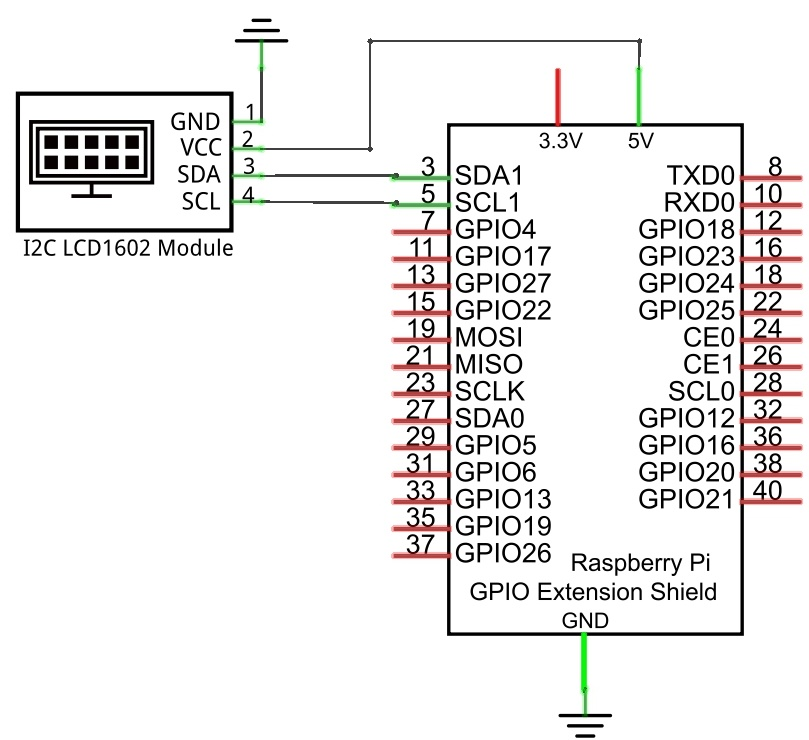
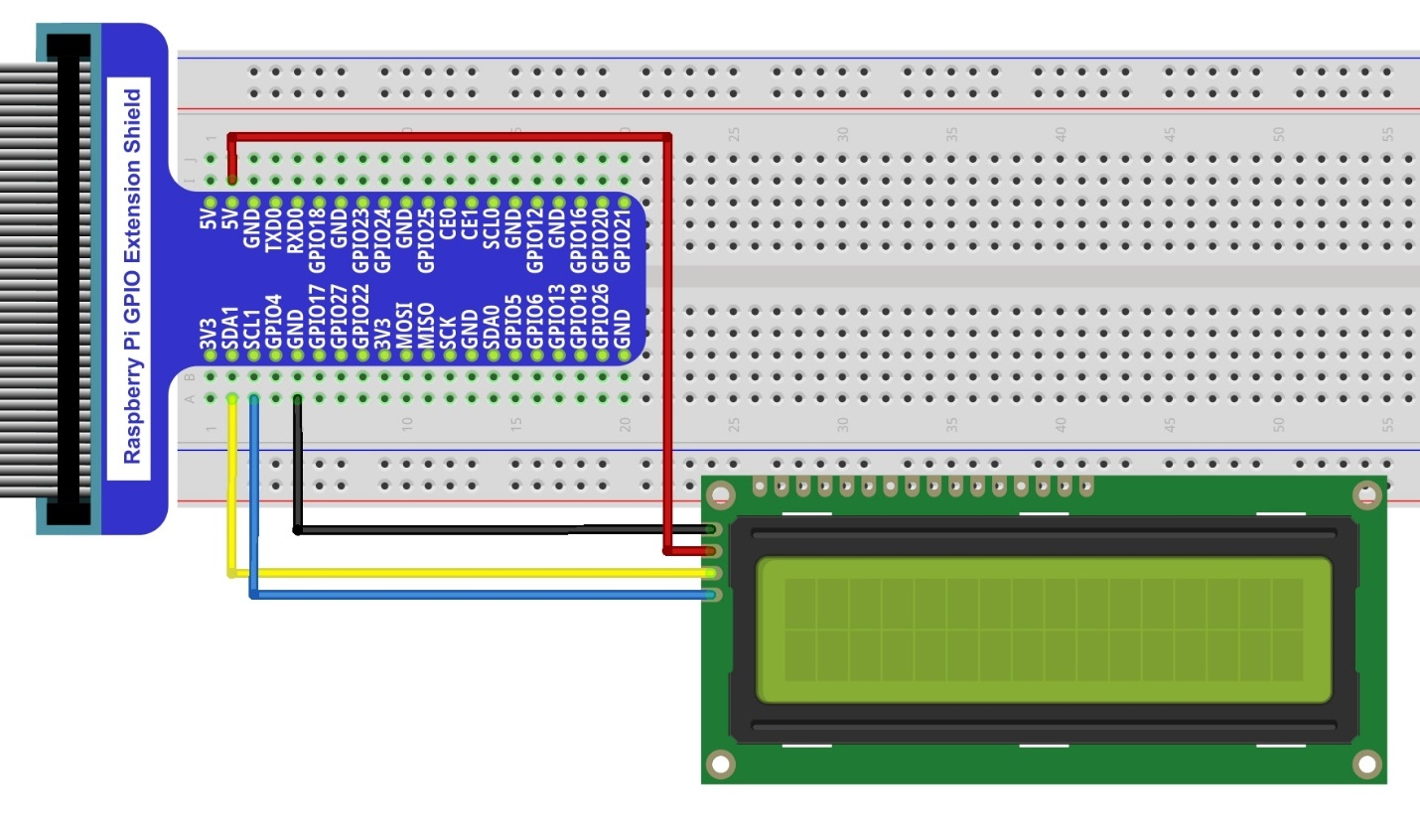
Note that the power supply for I2C LCD1602 in this circuit is 5V.
Schematic diagram
|
Hardware connection. If you need any support,please feel free to contact us via:
|
Note
It is necessary to configure 12C and install Smbus first (see Chapter 7 ADC for details)
13.3. Sketch
In this project, we will drive the LCD1602 display with I2C.
13.3.1. Sketch_I2CLCD1602
First, enter where the project is located:
$ cd ~/Freenove_Kit/Pi4j/Sketches/Sketch_13_I2CLCD1602

Enter the command to run the code.
$ jbang I2CLCD1602.java

When the code is running, you can see the first line of the display shows “Hello World”, and the second line displays the running time in second.
Press Ctrl+C to exit the program.
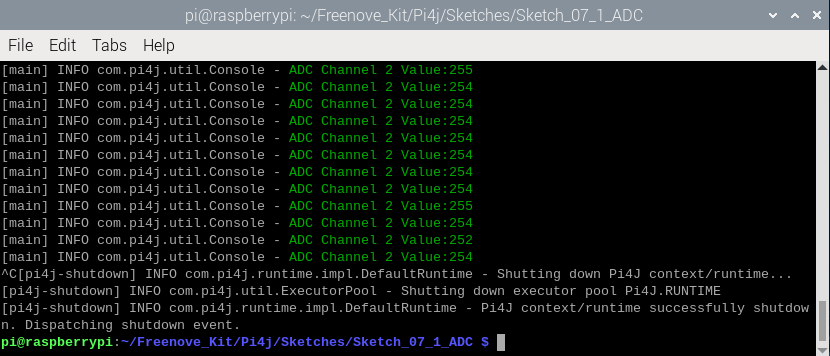
You can run the following command to open the code with Geany to view and edit it.
$ geany I2CLCD1602.java
Click the icon to run the code.
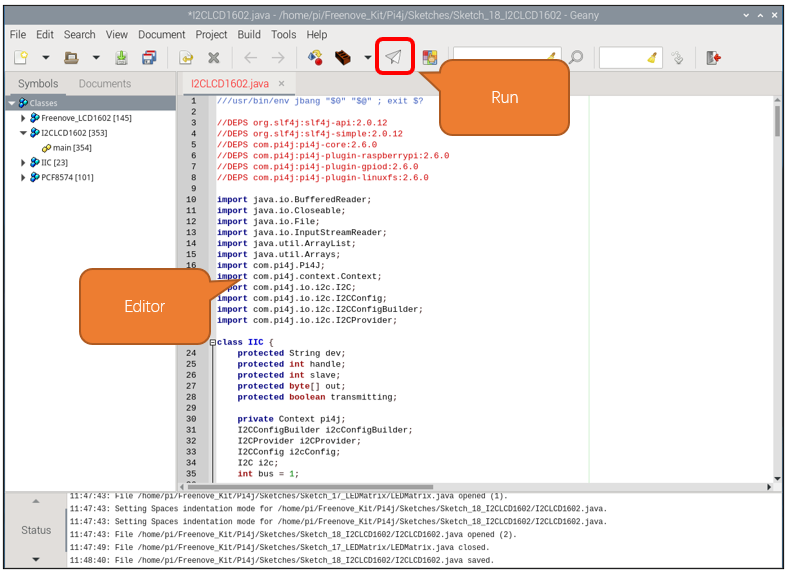
If the code fails to run, please check Geany Configuration.
The following is program code:
  1// Shebang line for JBang to execute this script directly
  2///usr/bin/env jbang "$0" "$@" ; exit $?
  3
  4// Dependencies for this script
  5//DEPS org.slf4j:slf4j-api:2.0.12
  6//DEPS org.slf4j:slf4j-simple:2.0.12
  7//DEPS com.pi4j:pi4j-core:2.6.0
  8//DEPS com.pi4j:pi4j-plugin-raspberrypi:2.6.0
  9//DEPS com.pi4j:pi4j-plugin-gpiod:2.6.0
 10//DEPS com.pi4j:pi4j-plugin-linuxfs:2.6.0
 11
 12import java.io.BufferedReader;
 13import java.io.Closeable;
 14import java.io.File;
 15import java.io.InputStreamReader;
 16import java.util.ArrayList;
 17import java.util.Arrays;
 18
 19import com.pi4j.Pi4J;
 20import com.pi4j.context.Context;
 21import com.pi4j.io.i2c.I2C;
 22import com.pi4j.io.i2c.I2CConfig;
 23import com.pi4j.io.i2c.I2CConfigBuilder;
 24import com.pi4j.io.i2c.I2CProvider;
 25
 26class IIC {
 27  protected String dev;
 28  protected int handle;
 29  protected int slave;
 30  protected byte[] out;
 31  protected boolean transmitting;
 32
 33  private Context pi4j;
 34  I2CConfigBuilder i2cConfigBuilder;
 35  I2CProvider i2CProvider;
 36  I2CConfig i2cConfig;
 37  I2C i2c;
 38  int bus = 1;
 39
 40  public IIC(int bus) {
 41    this.bus = bus;
 42    constructor();
 43  }
 44
 45  public IIC(String s) {
 46    String b = s.split("i2c-")[1];
 47    try {
 48      this.bus = Integer.parseInt(b);
 49    } catch (Exception e) {
 50      this.bus = 1;
 51    }
 52    constructor();
 53  }
 54
 55  private void constructor() {
 56    pi4j = Pi4J.newAutoContext();
 57    i2CProvider = pi4j.provider("linuxfs-i2c");
 58    i2cConfigBuilder = I2C.newConfigBuilder(pi4j).bus(bus);
 59  }
 60
 61  public void beginTransmission(int address) {
 62    if (i2cConfig == null) {
 63      i2cConfig = i2cConfigBuilder.device(address).build();
 64    }
 65
 66    if (i2c == null) {
 67      i2c = i2CProvider.create(i2cConfig);
 68    }
 69  }
 70
 71  public void write(int b) {
 72    i2c.write(b);
 73  }
 74
 75  public byte read() {
 76    return i2c.readByte();
 77  }
 78
 79  public byte[] read(int size) {
 80    return i2c.readByteBuffer(size).array();
 81  }
 82
 83  public void endTransmission() {
 84    i2c.close();
 85  }
 86
 87  public static String[] list() {
 88    ArrayList<String> devs = new ArrayList<String>();
 89    File dir = new File("/dev");
 90    File[] files = dir.listFiles();
 91    if (files != null) {
 92      for (File file : files) {
 93        if (file.getName().startsWith("i2c-")) {
 94          devs.add(file.getName());
 95        }
 96      }
 97    }
 98    String[] tmp = devs.toArray(new String[devs.size()]);
 99    Arrays.sort(tmp);
100    return tmp;
101  }
102}
103
104class PCF8574 {
105  private int address;
106  private IIC i2c;
107  private int currValue;
108
109  public PCF8574(int addr) {
110    address = addr;
111    i2c = new IIC(IIC.list()[0]);
112    currValue = 0;
113  }
114
115  public int digitalRead(int pin) {
116    int val = readByte();
117    return ((val & (1 << pin)) == (1 << pin)) ? 1 : 0;
118  }
119
120  public int readByte() {
121    return currValue;
122  }
123
124  public void digitalWrite(int pin, int val) {
125    int value = currValue;
126    if (val == 1) {
127      value |= (1 << pin);
128    } else if (val == 0) {
129      value &= ~(1 << pin);
130    } else {
131      return;
132    }
133    writeByte(value);
134  }
135
136  public void writeByte(int data) {
137    currValue = data;
138    i2c.beginTransmission(address);
139    i2c.write(data);
140    i2c.endTransmission();
141  }
142
143  public int getCurrentValue() {
144    return currValue;
145  }
146}
147
148class Freenove_LCD1602 {
149  final public int // HD44780U commands
150  CLEAR = 0x01,
151      HOME = 0x02,
152      ENTRY = 0x04,
153      CTRL = 0x08,
154      CDSHIFT = 0x10,
155      FUNC = 0x20,
156      CGRAM = 0x40,
157      DDRAM = 0x80;
158
159  final public int // flags for display entry mode
160  ENTRY_SH = 0x01,
161      ENTRY_ID = 0x02;
162
163  final public int // flags for display/cursor on/off control
164  BLINK_CTRL = 0x01,
165      CURSOR_CTRL = 0x02,
166      DISPLAY_CTRL = 0x04;
167
168  final public int // flags function set
169  FUNC_F = 0x04,
170      FUNC_N = 0x08,
171      FUNC_DL = 0x10,
172      MOVERIGHT = 0x04, // flags for display/cursor shift
173      MOVELEFT = 0x00,
174      DISPLAYMOVE = 0x08,
175      CURSORMOVE = 0x00;
176
177  final public int[] rowOff = { 0x00, 0x40, 0x14, 0x54 };
178  private int func = 0, control = 0;
179  PCF8574 pcf;
180  private int rows, cols, rsPin, enPin, rwPin;
181  int displayMode = 0;
182
183  private void delay(long ms) {
184    long startTime = System.nanoTime();
185    long endTime = startTime + (ms * 1000 * 1000);
186    while (System.nanoTime() < endTime) {
187    }
188  }
189
190  private int constrain(int value, int min, int max) {
191    if (value < min) {
192      return min;
193    } else if (value > max) {
194      return max;
195    } else {
196      return value;
197    }
198  }
199
200  public Freenove_LCD1602(PCF8574 ipcf) {
201    pcf = ipcf;
202    rows = 2;
203    cols = 16;
204    rsPin = 0; // connect to PCF8574 module
205    enPin = 2;
206    rwPin = 1;
207
208    pcf.digitalWrite(rsPin, 0);
209    pcf.digitalWrite(enPin, 0);
210    pcf.digitalWrite(rwPin, 0);
211    delay(35);
212    func = FUNC | FUNC_DL; // set 8-bit mode 3 times
213    put4Command(func >> 4);
214    delay(35);
215    put4Command(func >> 4);
216    delay(35);
217    put4Command(func >> 4);
218    delay(35);
219    func = FUNC; // set 4-bit mode
220    put4Command(func >> 4);
221    delay(35);
222    if (rows > 1) {
223      func = FUNC_N;
224      putCommand(func);
225      delay(35);
226    }
227    display(true); // lcd initializtion
228    lcdCursor(false);
229    cursorBlink(false);
230
231    displayMode = ENTRY | ENTRY_ID;
232    putCommand(displayMode);
233    putCommand(CDSHIFT | MOVERIGHT);
234    backLightON();
235    home();
236    lcdClear();
237  }
238
239  // for sending data/cmds
240  public void sendDataCmd(int data) {
241    int d4 = data & 0xf0;
242    int currentValue = pcf.getCurrentValue();
243    pcf.writeByte(d4 | (currentValue & 0x0f));
244    strobe();
245    currentValue = pcf.getCurrentValue();
246    d4 = (data << 4) & 0xf0;
247    pcf.writeByte(d4 | (currentValue & 0x0f));
248    strobe();
249  }
250
251  // send command
252  public void putCommand(int cmd) {
253    pcf.digitalWrite(rsPin, 0);
254    sendDataCmd(cmd);
255    delay(2);
256  }
257
258  public void put4Command(int command) {
259    int currentValue = pcf.getCurrentValue();
260    pcf.digitalWrite(rsPin, 0);
261    pcf.writeByte(((command << 4) & 0xf0) | (currentValue & 0x0f));
262    strobe();
263  }
264
265  // pulse enable
266  public void strobe() {
267    pcf.digitalWrite(enPin, 1);
268    pcf.digitalWrite(enPin, 0);
269  }
270
271  // send a data byte to be displayed on the display.
272  public void putChar(char data) {
273    pcf.digitalWrite(rsPin, 1);
274    sendDataCmd(data);
275  }
276
277  // Send a string to be displayed on the display.
278  public void puts(String str) {
279    for (int i = 0; i < str.length(); i++) {
280      putChar(str.charAt(i));
281    }
282  }
283
284  // turn display, cursor, cursor blinking on/off
285  public void display(boolean state) {
286    if (state) {
287      control |= DISPLAY_CTRL;
288    } else {
289      control &= ~DISPLAY_CTRL;
290    }
291    putCommand(CTRL | control);
292  }
293
294  public void lcdCursor(boolean state) {
295    if (state) {
296      control |= CURSOR_CTRL;
297    } else {
298      control &= ~CURSOR_CTRL;
299    }
300    putCommand(CTRL | control);
301  }
302
303  public void cursorBlink(boolean state) {
304    if (state) {
305      control |= BLINK_CTRL;
306    } else {
307      control &= ~BLINK_CTRL;
308    }
309    putCommand(CTRL | control);
310  }
311
312  // set the position of the cursor on the display
313  public void position(int x, int y) {
314    constrain(x, 0, cols);
315    constrain(y, 0, rows);
316    putCommand(x + (DDRAM | rowOff[y]));
317  }
318
319  // Home the cursor
320  public void home() {
321    putCommand(HOME);
322  }
323
324  // clear the screen
325  public void lcdClear() {
326    putCommand(CLEAR);
327    putCommand(HOME);
328  }
329
330  // turn on the backLight
331  public void backLightON() {
332    pcf.digitalWrite(3, 1);
333  }
334
335  // turn off the backLight
336  public void backLightOFF() {
337    pcf.digitalWrite(3, 0);
338  }
339
340  // scroll the display a unit to left
341  public void scrollDisplayLeft() {
342    putCommand(CDSHIFT | DISPLAYMOVE | MOVELEFT);
343  }
344
345  // scroll the display a unit to right
346  public void scrollDisplayRight() {
347    putCommand(CDSHIFT | DISPLAYMOVE | MOVERIGHT);
348  }
349
350  // text flows left to right
351  public void leftToRight() {
352    displayMode |= ENTRY_ID;
353    putCommand(ENTRY | displayMode);
354  }
355
356  // text flows right to left
357  public void rightToLeft() {
358    displayMode &= ~ENTRY_ID;
359    putCommand(ENTRY | displayMode);
360  }
361
362  // scroll the display follow the cursor
363  public void autoScroll() {
364    displayMode |= ENTRY_SH;
365    putCommand(ENTRY | displayMode);
366  }
367
368  public void noAutoScroll() {
369    displayMode &= ~ENTRY_SH;
370    putCommand(ENTRY | displayMode);
371  }
372}
373
374public class I2CLCD1602 {
375  public static void main(String[] args) throws Exception {
376    PCF8574 pcf = new PCF8574(0x27); // or 0x3F
377    Freenove_LCD1602 lcd;
378    lcd = new Freenove_LCD1602(pcf);
379    lcd.position(0, 0); // show time on the lcd display
380    lcd.puts("Hello World.");
381    try {
382      int count = 0;
383      while (true) {
384        String buf = "Count: " + count;
385        lcd.position(0, 1); // show time on the lcd display
386        lcd.puts(buf);
387        Thread.sleep(1000);
388        count++;
389      }
390    } catch (InterruptedException e) {
391      Thread.currentThread().interrupt();
392    }
393  }
394}
Constructor, assigns the I2C bus to bus, and calls the constructor function to initialize the I2C bus.
 1public IIC(int bus) {
 2  this.bus = bus;
 3  constructor();
 4}
 5
 6public IIC(String s) {
 7  String b = s.split("i2c-")[1];
 8  try {
 9    this.bus = Integer.parseInt(b);
10  } catch (Exception e) {
11    this.bus = 1;
12  }
13  constructor();
14}
I2C constructor, initialize the I2C bus.
1private void constructor() {
2  pi4j = Pi4J.newAutoContext();
3  i2CProvider = pi4j.provider("linuxfs-i2c");
4  i2cConfigBuilder = I2C.newConfigBuilder(pi4j).bus(bus);
5}
I2C bus acquisition function. Calling the list() function can obtain the names of all I2C buses currently existing on the Raspberry Pi.
 1public static String[] list() {
 2  ArrayList<String> devs = new ArrayList<String>();
 3  File dir = new File("/dev");
 4  File[] files = dir.listFiles();
 5  if (files != null) {
 6    for (File file : files) {
 7      if (file.getName().startsWith("i2c-")) {
 8        devs.add(file.getName());
 9      }
10    }
11  }
12  String[] tmp = devs.toArray(new String[devs.size()]);
13  Arrays.sort(tmp);
14  return tmp;
15}
Use the pi4j library to repackage the I2C functions. These functions refer to the classic usage of Arduino. This is to be compatible with the subsequent PCF8574 class and Freenove_LCD1602 class, making it easier to drive LCD1602.
 1public void beginTransmission(int address) {
 2  if (i2cConfig == null) {
 3    i2cConfig = i2cConfigBuilder.device(address).build();
 4  }
 5
 6  if (i2c == null) {
 7    i2c = i2CProvider.create(i2cConfig);
 8  }
 9}
10
11public void write(int b) {
12  i2c.write(b);
13}
14
15public byte read() {
16  return i2c.readByte();
17}
18
19public byte[] read(int size) {
20  return i2c.readByteBuffer(size).array();
21}
22
23public void endTransmission() {
24  i2c.close();
25}
The following are the two classes we wrote for LCD1602 in reference to Arduino. Here, we do not go into too much detail here. If you are interested in this code, you can use Geany to view the code.
1class PCF8574 {
2  ......
3}
4
5class Freenove_LCD1602 {
6  ......
7}
Initialize PCF8574 and Freenove_LCD1602 classes, and assign the value to LCD.
1PCF8574 pcf = new PCF8574(0x27); // or 0x3F
2Freenove_LCD1602 lcd;
3lcd = new Freenove_LCD1602(pcf);
At the first lin of LCD1602, print the character “Hello World”.
1lcd.position(0, 0); // show time on the lcd display
2lcd.puts("Hello World.");
Print the character “Count” and the counts number at the second line every one second.
1int count = 0;
2while (true) {
3  String buf = "Count: " + count;
4  lcd.position(0, 1); // show time on the lcd display
5  lcd.puts(buf);
6  Thread.sleep(1000);
7  count++;
8}
In Java, an InterruptedException is thrown when a thread’s waiting, sleeping (e.g., using ‘Thread.sleep()’), or other blocking operations are interrupted. When a thread is interrupted, its interrupted status is set to true, and any of these blocking operations will result in an ‘InterruptedException’ being thrown.
When ‘InterruptedException’ is capured, ‘Thread.currentThread().interrupt()’ is called keep the interrupt status, so that the thread can respond to the interruption request appropriately.
1} catch (InterruptedException e) {
2  Thread.currentThread().interrupt();
3}