Chapter 13 Servo
Previously, we learned how to control the speed and rotational direction of a DC Motor. In this chapter, we will learn about Servos which are a rotary actuator type motor that can be controlled rotate to specific angles.
Project Sweep
First, we need to learn how to make a Servo rotate.
Component knowledge
Servo
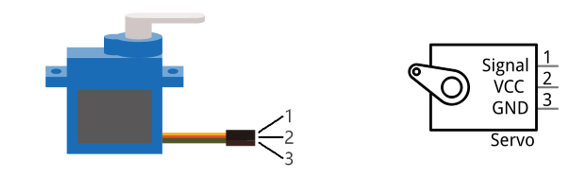
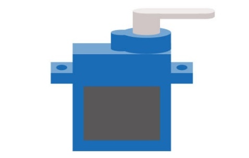
Servo is a compact package which consists of a DC Motor, a set of reduction gears to provide torque, a sensor and control circuit board. Most Servos only have a 180-degree range of motion via their “horn”. Servos can output higher torque than a simple DC Motor alone and they are widely used to control motion in model cars, model airplanes, robots, etc. Servos have three wire leads which usually terminate to a male or female 3-pin plug. Two leads are for electric power: Positive (2-VCC, Red wire), Negative (3-GND, Brown wire), and the signal line (1-Signal, Orange wire) as represented in the Servo provided in your Kit.
We will use a 50Hz PWM signal with a duty cycle in a certain range to drive the Servo. The lasting time 0.5ms-2.5ms of PWM single cycle high level corresponds to the Servo angle 0 degrees - 180 degree linearly. Part of the corresponding values are as follows:
Note
the lasting time of high level corresponding to the servo angle is absolute instead of accumulating. For example, the high level time lasting for 0.5ms correspond to the 0 degree of the servo. If the high level time lasts for another 1ms, the servo rotates to 45 degrees.
High level time |
Servo angle |
|---|---|
0.5ms |
0 degree |
1ms |
45 degree |
1.5ms |
90 degree |
2ms |
135 degree |
2.5ms |
180 degree |
When you change the Servo signal value, the Servo will rotate to the designated angle.
Component List
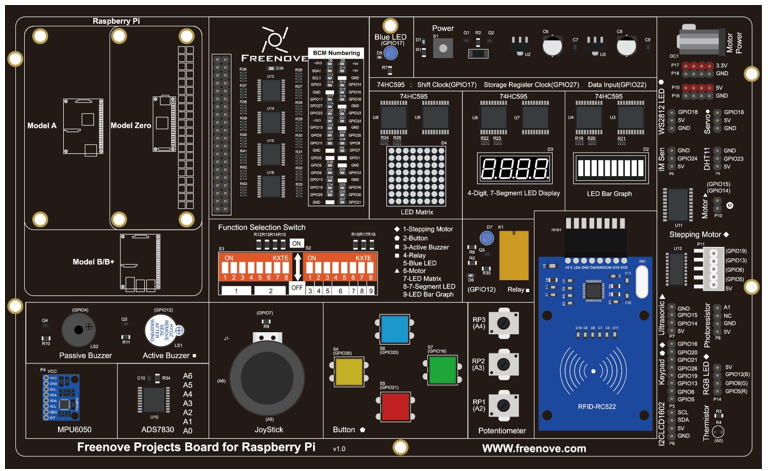
Freenove Projects Board for Raspberry Pi |
|
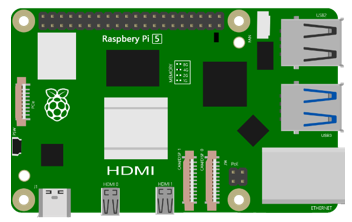
Raspberry Pi |
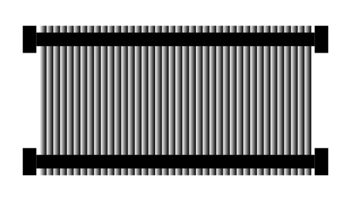
GPIO Ribbon Cable |
Jumper Wire |
Servo |

Circuit
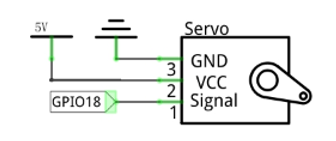
Schematic diagram |
|
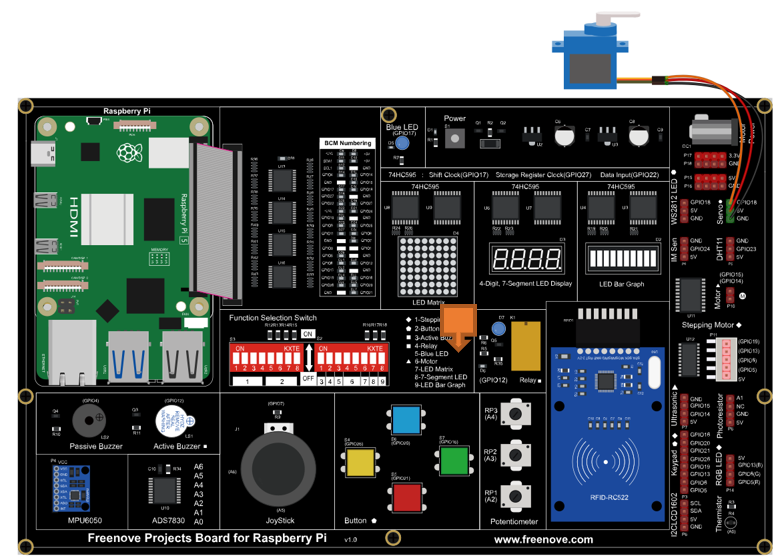
Hardware connection: |
|
Note
If you have any concerns, please send an email to: support@freenove.com
Sketch
In this chapter, we will learn how to control the servo to rotate at the range of 0 to 180 degrees.
Sketch_13_1_Sweep
First, enter where the project is located:
$ cd ~/Freenove_Kit/Pi4j/Sketches/Sketch_13_1_Sweep

Enter the command to run the code.
$ jbang Sweep.java

When the code is running, you can see the servo rotate between 0 to 180 degrees.
Meanwhile, the messages are printed on the terminal.
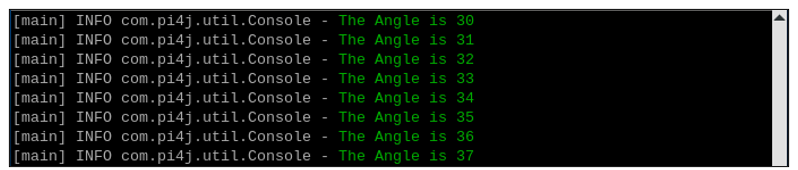
Press Ctrl+C to exit the code.

You can run the following command to open the code with Geany to view and edit it.
$ geany Sweep.java
Click the icon to run the code.
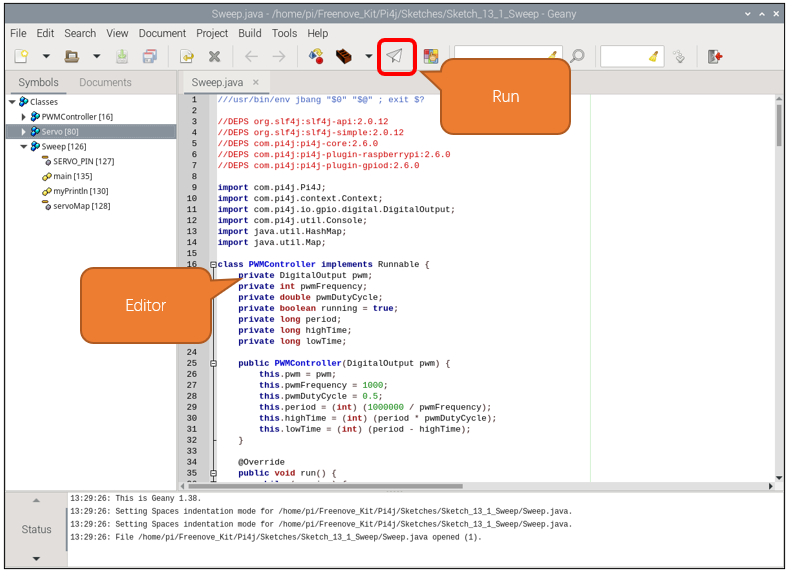
If the code fails to run, please check Geany Configuration.
The following is program code:
  1///usr/bin/env jbang "$0" "$@" ; exit $?
  2
  3//DEPS org.slf4j:slf4j-api:2.0.12
  4//DEPS org.slf4j:slf4j-simple:2.0.12
  5//DEPS com.pi4j:pi4j-core:2.6.0
  6//DEPS com.pi4j:pi4j-plugin-raspberrypi:2.6.0
  7//DEPS com.pi4j:pi4j-plugin-gpiod:2.6.0
  8
  9import com.pi4j.Pi4J;
 10import com.pi4j.context.Context;
 11import com.pi4j.io.gpio.digital.DigitalOutput;
 12import com.pi4j.util.Console;
 13import java.util.HashMap;
 14import java.util.Map;
 15
 16class PWMController implements Runnable {
 17    private DigitalOutput pwm;
 18    private int pwmFrequency;
 19    private double pwmDutyCycle;
 20    private boolean running = true;
 21    private long period;
 22    private long highTime;
 23    private long lowTime;
 24
 25    public PWMController(DigitalOutput pwm) {
 26        this.pwm = pwm;
 27        this.pwmFrequency = 1000;
 28        this.pwmDutyCycle = 0.5;
 29        this.period = (int) (1000000 / pwmFrequency);
 30        this.highTime = (int) (period * pwmDutyCycle);
 31        this.lowTime = (int) (period - highTime);
 32    }
 33
 34    @Override
 35    public void run() {
 36        while (running) {
 37            if (highTime != 0) {
 38                pwm.high();
 39                delayUs(highTime);
 40            }
 41            if (lowTime != 0) {
 42                pwm.low();
 43                delayUs(lowTime);
 44            }
 45        }
 46    }
 47
 48    public void setPwmFrequency(int frequency) {
 49        if (frequency != 0) {
 50            this.pwmFrequency = frequency;
 51            this.period = (int) (1000000 / pwmFrequency);
 52            this.highTime = (int) (period * pwmDutyCycle);
 53            this.lowTime = (int) (period - highTime);
 54        } else {
 55            this.pwmFrequency = 0;
 56            this.period = (int) (1000);
 57            this.highTime = (int) (0);
 58            this.lowTime = (int) (period - highTime);
 59        }
 60    }
 61
 62    public void setPwmDutyCycle(double dutyCycle) {
 63        this.pwmDutyCycle = dutyCycle;
 64        this.highTime = (int) (period * pwmDutyCycle);
 65        this.lowTime = (int) (period - highTime);
 66    }
 67
 68    private void delayUs(long us) {
 69        long startTime = System.nanoTime();
 70        long endTime = startTime + (us * 1000);
 71        while (System.nanoTime() < endTime) {
 72        }
 73    }
 74
 75    public void requestStop() {
 76        running = false;
 77    }
 78}
 79
 80class Servo {
 81    private final int pin;
 82    private final PWMController pwmController;
 83    private final Context pi4j;
 84
 85    public Servo(int pin) throws Exception {
 86        this.pin = pin;
 87        this.pi4j = Pi4J.newAutoContext();
 88        DigitalOutput pwm = pi4j.dout().create(pin);
 89        this.pwmController = new PWMController(pwm);
 90
 91        Thread pwmThread = new Thread(pwmController, "PWM Controller for Servo on PIN " + pin);
 92        pwmThread.start();
 93
 94        Runtime.getRuntime().addShutdownHook(new Thread(() -> {
 95            pwmController.requestStop();
 96            try {
 97                pwmThread.join();
 98            } catch (InterruptedException e) {
 99                Thread.currentThread().interrupt();
100            }
101        }));
102    }
103
104    public void setFrequency(int frequency) {
105        pwmController.setPwmFrequency(frequency);
106    }
107
108    public void setDutyCycle(double dutyCycle) {
109        pwmController.setPwmDutyCycle(dutyCycle);
110    }
111
112    public void setAngle(int angle) {
113        if (angle > 180 || angle < 0) {
114            return;
115        }
116        double dutyCycle = (((double) angle / 180.0 * 2) + 0.5) / 20;
117        pwmController.setPwmDutyCycle(dutyCycle);
118    }
119
120    public void shutdown() {
121        pwmController.requestStop();
122        pi4j.shutdown();
123    }
124}
125
126public class Sweep {
127    private static int SERVO_PIN = 18;
128    private static final Map<Integer, Servo> servoMap = new HashMap<>();
129
130    public static void myPrintln(String format, Object... args) {
131        Console console = new Console();
132        console.println(String.format("\u001B[32m" + format + "\u001B[0m", args));
133    }
134
135    public static void main(String[] args) throws Exception {
136        servoMap.put(SERVO_PIN, new Servo(SERVO_PIN));
137        Servo servo = servoMap.get(SERVO_PIN);
138        servo.setFrequency(50);
139        servo.setDutyCycle(0.075);
140
141        myPrintln("Start sweeping ...");
142        Thread.sleep(3000);
143
144        try {
145            while (true) {
146                for (int i = 0; i < 180; i++) {
147                    servo.setAngle(i);
148                    myPrintln("The Angle is %d", i);
149                    Thread.sleep(20);
150                }
151                for (int i = 180; i > 0; i--) {
152                    servo.setAngle(i);
153                    myPrintln("The Angle is %d", i);
154                    Thread.sleep(20);
155                }
156            }
157        } finally {
158            if (servo != null) {
159                servo.shutdown();
160            }
161        }
162    }
163}
Servo constructor, initializes the servo control pins, and adds a JVM shutdown hook to ensure that the PWM controller and Pi4J context are properly closed when the program exits.
 1public Servo(int pin) throws Exception {
 2    this.pin = pin;
 3    this.pi4j = Pi4J.newAutoContext();
 4    DigitalOutput pwm = pi4j.dout().create(pin);
 5    this.pwmController = new PWMController(pwm);
 6
 7    Thread pwmThread = new Thread(pwmController, "PWM Controller for Servo on PIN " + pin);
 8    pwmThread.start();
 9
10    Runtime.getRuntime().addShutdownHook(new Thread(() -> {
11        pwmController.requestStop();
12        try {
13            pwmThread.join();
14        } catch (InterruptedException e) {
15            Thread.currentThread().interrupt();
16        }
17    }));
18}
Set the PWM duty cycle according to the angle to control the servo to rotate to the specified position.
1public void setAngle(int angle) {
2    if (angle > 180 || angle < 0) {
3        return;
4    }
5    double dutyCycle = (((double) angle / 180.0 * 2) + 0.5) / 20;
6    pwmController.setPwmDutyCycle(dutyCycle);
7}
Initialize the servo controller and store it in servoMap.
1servoMap.put(SERVO_PIN, new Servo(SERVO_PIN));
Get the servo controller from servoMap.
1Servo servo = servoMap.get(SERVO_PIN);
The signal period of the servo is 20ms. According to the formula f=1/T, the frequency of the servo is set to 50Hz.
To control the servo to rotate to 0 degrees, a 1.5ms high level is required. 1.5ms/20ms=0.075, so the duty cycle of the servo is 0.075. Similarly, if you want the servo to rotate to 180 degrees, a 2.5ms high level is required, 2.5ms/20ms=0.375. You only need to modify the duty cycle value to control the rotation of the servo.
1servo.setFrequency(50);
2servo.setDutyCycle(0.075);
The main code controls the servo to rotate between 0-180 degrees and prints prompt information on the terminal interface.
 1while (true) {
 2    for (int i = 0; i < 180; i++) {
 3        servo.setAngle(i);
 4        myPrintln("The Angle is %d", i);
 5        Thread.sleep(20);
 6    }
 7    for (int i = 180; i > 0; i--) {
 8        servo.setAngle(i);
 9        myPrintln("The Angle is %d", i);
10        Thread.sleep(20);
11    }
12}
Project Knob
In this project, we will learn how to control the servo with a potentiometer.
Component List
Freenove Projects Board for Raspberry Pi |
|
Raspberry Pi |
GPIO Ribbon Cable |
Jumper Wire |
Servo |
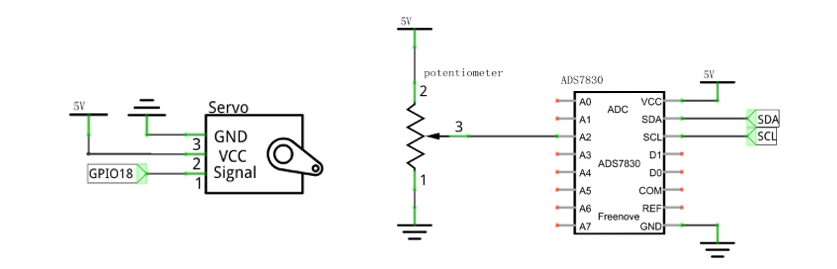
Circuit
Schematic diagram |
|
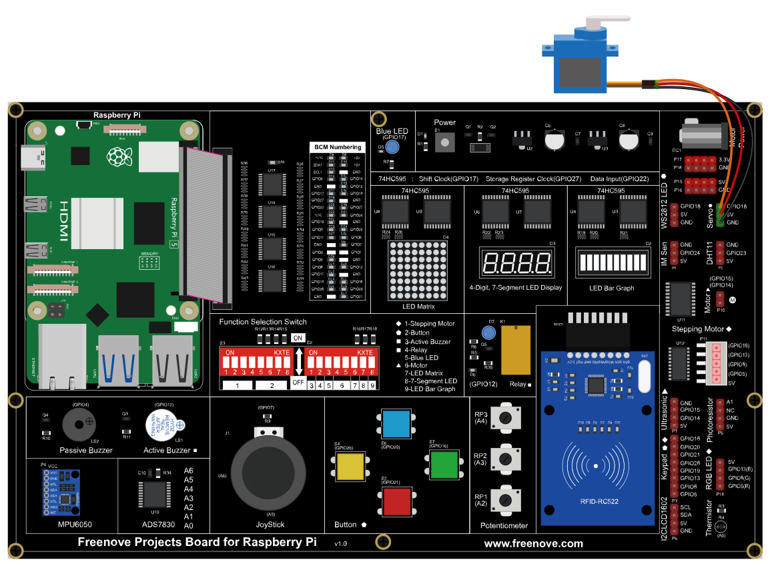
Hardware connection: |
|
Sketch
In this project, we will control the servo to rotate to a designated position by rotating the potentiometer.
Sketch_13_2_Knob
First, enter where the project is located:
cd ~/Freenove_Kit/Pi4j/Sketches/Sketch_13_2_Knob

Enter the command to run the code.
jbang Knob.java

When the code is running, rotating the potentiometer and you can see the servo angle change.
On the terminal, you can see messages printed.
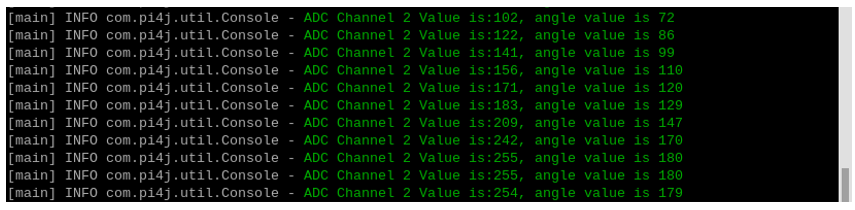
Press Ctrl+C to exit the program.

You can run the following command to open the code with Geany to view and edit it.
geany Knob.java
Click the icon to run the code.
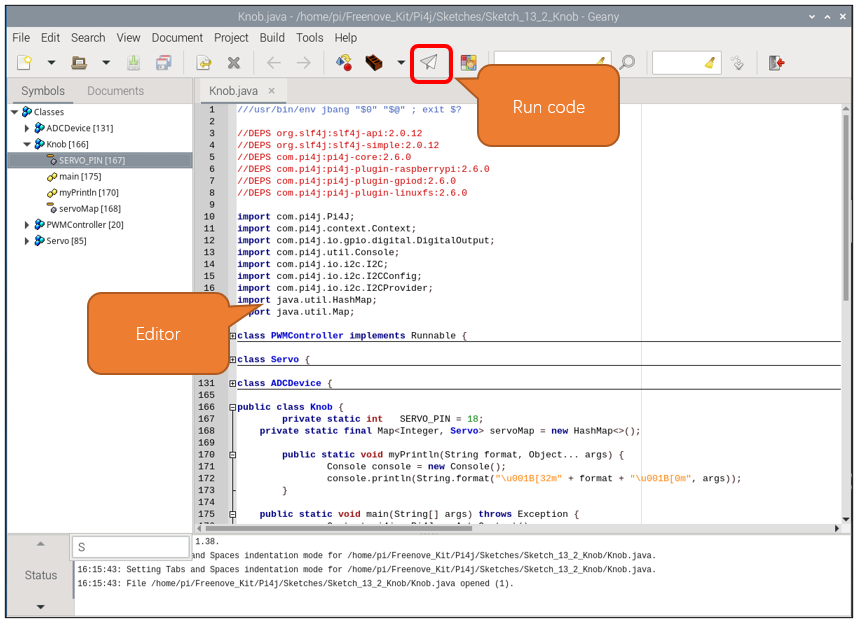
If the code fails to run, please check Geany Configuration.
The following is program code:
  1///usr/bin/env jbang "$0" "$@" ; exit $?
  2
  3//DEPS org.slf4j:slf4j-api:2.0.12
  4//DEPS org.slf4j:slf4j-simple:2.0.12
  5//DEPS com.pi4j:pi4j-core:2.6.0
  6//DEPS com.pi4j:pi4j-plugin-raspberrypi:2.6.0
  7//DEPS com.pi4j:pi4j-plugin-gpiod:2.6.0
  8//DEPS com.pi4j:pi4j-plugin-linuxfs:2.6.0
  9
 10import com.pi4j.Pi4J;
 11import com.pi4j.context.Context;
 12import com.pi4j.io.gpio.digital.DigitalOutput;
 13import com.pi4j.util.Console;
 14import com.pi4j.io.i2c.I2C;
 15import com.pi4j.io.i2c.I2CConfig;
 16import com.pi4j.io.i2c.I2CProvider;
 17import java.util.HashMap;
 18import java.util.Map;
 19
 20class PWMController implements Runnable {
 21    private DigitalOutput pwm;
 22	private int pwmFrequency;
 23	private double pwmDutyCycle;
 24    private boolean running = true;
 25	private long period;
 26	private long highTime;
 27	private long lowTime;
 28
 29    public PWMController(DigitalOutput pwm) {
 30        this.pwm = pwm;
 31		this.pwmFrequency = 1000;
 32		this.pwmDutyCycle = 0.5;
 33		this.period = (int) (1000000 / pwmFrequency);
 34		this.highTime = (int) (period * pwmDutyCycle);
 35		this.lowTime = (int) (period - highTime);
 36    }
 37
 38    @Override
 39    public void run() {
 40        while (running) {
 41            if(highTime!=0){
 42				pwm.high();
 43				delayUs(highTime);
 44			}
 45			if(lowTime!=0){
 46				pwm.low();
 47				delayUs(lowTime);
 48			}
 49        }
 50    }
 51
 52	public void setPwmFrequency(int frequency) {
 53        if(frequency!=0){
 54			this.pwmFrequency = frequency;
 55			this.period = (int) (1000000 / pwmFrequency);
 56			this.highTime = (int) (period * pwmDutyCycle);
 57			this.lowTime = (int) (period - highTime);
 58		}
 59		else{
 60			this.pwmFrequency = 0;
 61			this.period = (int) (1000);
 62			this.highTime = (int) (0);
 63			this.lowTime = (int) (period - highTime);
 64		}
 65    }
 66
 67	public void setPwmDutyCycle(double dutyCycle) {
 68        this.pwmDutyCycle = dutyCycle;
 69		this.highTime = (int) (period * pwmDutyCycle);
 70		this.lowTime = (int) (period - highTime);
 71    }
 72
 73    private void delayUs(long us) {
 74        long startTime = System.nanoTime();
 75        long endTime = startTime + (us * 1000);
 76        while (System.nanoTime() < endTime) {
 77        }
 78    }
 79
 80    public void requestStop() {
 81        running = false;
 82    }
 83}
 84
 85class Servo {
 86    private final int pin;
 87    private final PWMController pwmController;
 88    private final Context pi4j;
 89
 90    public Servo(int pin) throws Exception {
 91        this.pin = pin;
 92        this.pi4j = Pi4J.newAutoContext();
 93        DigitalOutput pwm = pi4j.dout().create(pin);
 94        this.pwmController = new PWMController(pwm);
 95
 96        Thread pwmThread = new Thread(pwmController, "PWM Controller for Servo on PIN " + pin);
 97        pwmThread.start();
 98
 99        Runtime.getRuntime().addShutdownHook(new Thread(() -> {
100            pwmController.requestStop();
101            try {
102                pwmThread.join();
103            } catch (InterruptedException e) {
104                Thread.currentThread().interrupt();
105            }
106        }));
107    }
108
109    public void setFrequency(int frequency) {
110        pwmController.setPwmFrequency(frequency);
111    }
112
113    public void setDutyCycle(double dutyCycle) {
114        pwmController.setPwmDutyCycle(dutyCycle);
115    }
116
117	public void setAngle(int angle){
118		if(angle >180 || angle < 0){
119			return;
120		}
121		double dutyCycle = (((double)angle/180.0*2)+0.5)/20;
122		pwmController.setPwmDutyCycle(dutyCycle);
123	}
124
125    public void shutdown() {
126        pwmController.requestStop();
127        pi4j.shutdown();
128    }
129}
130
131class ADCDevice {
132    private final I2C adcChip;
133    private final int adcChipAddr;
134
135    public ADCDevice(Context pi4j, I2CProvider provider, int adcChipAddr) throws Exception {
136        this.adcChipAddr = adcChipAddr;
137        I2CConfig i2cConfig = I2C.newConfigBuilder(pi4j).id("ADCDevice").bus(1).device(adcChipAddr).build();
138        this.adcChip = provider.create(i2cConfig);
139    }
140
141    public boolean detectI2C() throws Exception {
142        try {
143            adcChip.write(0);
144            byte[] data = new byte[1];
145            int bytesRead = adcChip.read(data, 0, 1);
146            return bytesRead == 1;
147        } catch (Exception e) {
148            return false;
149        }
150    }
151
152    public int analogRead(int chn) {
153        byte command = (byte) (0x84 | (((chn << 2 | chn >> 1) & 0x07) << 4));
154        adcChip.write(command);
155        byte[] data = new byte[1];
156        int bytesRead = adcChip.read(data, 0, 1);
157        if (bytesRead == 1) {
158            int adcValue = data[0] & 0xFF;
159            return adcValue;
160        } else {
161            return -1;
162        }
163    }
164}
165
166public class Knob {
167	private static int   SERVO_PIN = 18;
168    private static final Map<Integer, Servo> servoMap = new HashMap<>();
169
170	public static void myPrintln(String format, Object... args) {
171		Console console = new Console();
172		console.println(String.format("\u001B[32m" + format + "\u001B[0m", args));
173	}
174
175    public static void main(String[] args) throws Exception {
176		Context pi4j = Pi4J.newAutoContext();
177		I2CProvider i2CProvider = pi4j.provider("linuxfs-i2c");
178
179		servoMap.put(SERVO_PIN, new Servo(SERVO_PIN));
180
181		Servo servo = servoMap.get(SERVO_PIN);
182		servo.setFrequency(50);
183		servo.setDutyCycle(0.075);
184
185		myPrintln("Start sweeping ...");
186		Thread.sleep(1000);
187		try {
188            int ADC_CHIP_ADDR = 0x48;
189            ADCDevice adcDevice = new ADCDevice(pi4j, i2CProvider, ADC_CHIP_ADDR);
190
191            if (adcDevice.detectI2C()) {
192                int ADC_CHANNEL = 2;
193                while (true) {
194                    int adcValue = adcDevice.analogRead(ADC_CHANNEL);
195					int angle = (int)((double)adcValue/255.0*180);
196                    if (adcValue != -1) {
197						myPrintln("ADC Channel %d Value is:%d, angle value is %d", ADC_CHANNEL, adcValue, angle);
198						servo.setAngle(angle);
199                    } else {
200                        myPrintln("Failed to read data from ADC.");
201                    }
202                    Thread.sleep(100);
203                }
204            } else {
205                myPrintln("ADS7830 device not detected at address 0x" + Integer.toHexString(ADC_CHIP_ADDR));
206            }
207        }
208		finally {
209            if (servo != null) {
210				servo.shutdown();
211			}
212        }
213    }
214}
The ADC value at the potentiometer is obtained every 100 milliseconds and is converted into an angle value, which is provided to the servo angle control function, and a prompt message is printed on the terminal interface.
 1if (adcDevice.detectI2C()) {
 2    int ADC_CHANNEL = 2;
 3    while (true) {
 4        int adcValue = adcDevice.analogRead(ADC_CHANNEL);
 5        int angle = (int)((double)adcValue/255.0*180);
 6        if (adcValue != -1) {
 7            myPrintln("ADC Channel %d Value is:%d, angle value is %d", ADC_CHANNEL, adcValue, angle);
 8            servo.setAngle(angle);
 9        } else {
10            myPrintln("Failed to read data from ADC.");
11        }
12        Thread.sleep(100);
13    }
14}